Why On-Page SEO Matters for Local Businesses?
Local searches drive real traffic: 46% of Google queries seek local information, and 78% of mobile local searches lead to an in-store purchase. Yet 58% of businesses aren’t optimizing for local search.
For example, a San Jose HVAC contractor saw organic traffic jump 453% in 12 months by focusing on local on-page SEO.
In short, optimizing your site’s pages (titles, content, metadata, etc.) directly for your area can put you ahead of competitors and tap into high-intent local buyers.
Local SEO vs. Traditional SEO – What’s the Difference?
Local SEO targets geographic intent, whereas traditional SEO is broader in scope. It’s about ranking for “keyword + city” queries and appearing in map listings.
As Search Engine Land notes, local SEO “narrows the focus” to a specific city or neighborhood, unlike traditional SEO, which aims for national or global visibility.
For instance, ranking for “HVAC repair in Austin” is easier (and more relevant to local customers) than just “HVAC repair” across the whole country.
Local SEO also emphasizes things like Google Business Profile listings, local reviews, and proximity, which traditional (non-local) SEO does not.
The Impact of On-Page Factors on Local Search Rankings
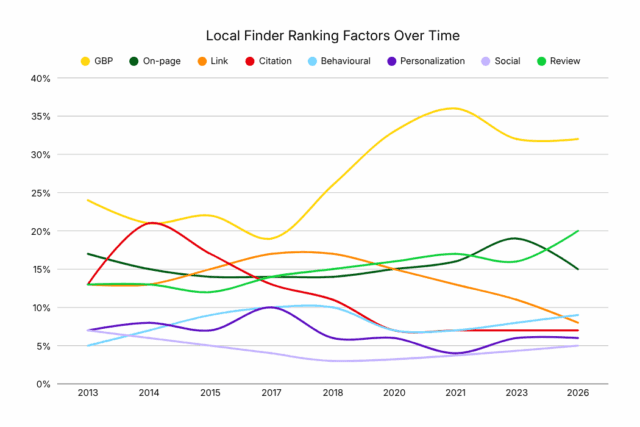
This chart shows Impact of On-Page Factors on Local Search Rankings
On-page optimization is crucial for local ranking. In fact, BrightLocal found that on-page factors make up about 33% of local organic ranking signals.
The chart above (from BrightLocal’s survey) shows that on-page signals (green) have remained a steady contributor to local rankings over time.
Key on-page factors for local SEO include: using geographic keywords in your content and title tags, having dedicated pages per service/area, and keeping accurate NAP info.
Google’s algorithm rewards pages that clearly match local intent. For example, BrightLocal’s data shows that having your city and state in your title tag is a top 10 local ranking factor. In practice, optimizing your titles, headings, and content for location and service keywords has a proven impact on getting found locally.
Key Metrics Local Businesses Should Care About
Track the metrics that reflect local visibility and customer action. 92% of local searchers pick businesses on the first page of results, so monitor your ranking (especially in Google’s 3-pack).
Measure local organic traffic from Google Search Console, growth means your on-page content is winning queries.
Equally track your Google Business Profile (GBP) metrics: views, calls, and direction requests. Notably, 88% of local mobile searches lead to a store visit or call within 24 hours, so GBP calls and clicks are vital outcomes.
Also watch engagement (CTR and conversion): a high impression count but low click-through-rate suggests your snippets (titles/meta) aren’t compelling. Since 61% of mobile searchers are more likely to contact a local business with a mobile-friendly site, mobile usability and load speed are critical metrics too.
In sum, focus on visibility in local pack rankings, organic search traffic, GBP actions (calls/directions), and ultimately leads or sales (form submissions, calls) as your success metrics.
Practical On-Page SEO Checklist for Local Business Websites
Completing your Google Business Profile to NAP consistency. On your website pages, cover these essentials:
1. Optimize Page Titles for Local Relevance
Including your location and service in the title tag is vital. Studies show that titles containing city/state and keywords are strong local ranking signals.
Checklist:
- Include your city or region keyword and main service naturally (e.g., “AC Repair in Austin, TX”).
- Keep titles under ~60 characters so they display fully in search results.
- Put the primary keyword early (e.g., “HVAC Contractor | [City]”).
Custom meta descriptions help entice clicks. Mention your city or neighborhood and a clear call-to-action.
Checklist:
- Keep metas under 155 characters so the full description appears in SERPs.
- Highlight a call-to-action (e.g., “Call now for a free quote”).
- Include local modifiers (city name, zip code, nearby landmark) to align with search intent.
Organize content with headers and sprinkle local keywords.
Checklist:
- Use one H1 tag per page featuring the main service and location (e.g., “Plumbing Services in [City]”).
- Break content into H2/H3 headings that include secondary local keywords (neighborhoods, additional services).
- Maintain a logical outline – headers should outline your page’s content hierarchy.
4. Include NAP (Name, Address, Phone) on Every Page
Show your business info consistently site-wide. Even small errors discourage customers – 62% of people avoid a business if they find incorrect information online.
Checklist:
- Display your full business name, address, and phone number (NAP) in the footer or header of every page.
- Use the same format (abbreviations, punctuation) across your site and online listings.
- Add structured data markup for NAP to help Google verify your info. (Tools like Google’s Structured Data Helper can assist.)
Have a dedicated page for each service area or city. BrightLocal found that having a unique page per service/location is the top local ranking factor.
Checklist:
- For each city/neighborhood you serve, create a separate page with local content.
- Tailor the content to that area: mention landmarks, local customer testimonials, or case studies.
- Embed a Google Map and local testimonials or reviews on each page to enhance trust.
6. Optimize URLs for Local Keywords
Your URL structure should be short and descriptive.
Checklist:
- Include location or service in the URL slug (e.g., example.com/air-conditioner-repair-austin).
- Avoid long query strings or unnecessary characters.
- Use hyphens to separate words. A clean URL is more user- and SEO-friendly.
Learn Local SEO Keyword Research (Step-by-Step Guide)
7. Use Internal Linking to Boost Page Authority
Link related pages to help users and pass SEO value. Avalanche Creative notes that internal links “distribute page authority” and improve navigation.
Checklist:
- From your blog and service pages, link to your location pages and vice versa.
- Use anchor text that includes local modifiers (e.g., “HVAC services in Austin”).
- Link keywords in headings or key sentences to other relevant internal pages (e.g., service to service).
8. Add Local Business Schema Markup
Structured data helps search engines understand your business.
Checklist:
- Use the “LocalBusiness” schema (via JSON-LD markup) to specify your business type, address, hours, etc.
- Include properties like addressLocality, addressRegion, and telephone.
- Use Google’s Structured Data Testing Tool to verify the markup.
Here is the Local business schema template:
<script type="application/ld+json">
{
"@context": "https://schema.org",
"@type": "LocalBusiness",
"name": "",
"image": "",
"@id": "",
"url": "",
"telephone": "",
"address": {
"@type": "PostalAddress",
"streetAddress": "",
"addressLocality": "",
"postalCode": "",
"addressCountry": ""
}
}
</script>
9. Optimize Images with Local Alt Text
Help Google associate your visuals with your location.
Checklist:
- Give images descriptive alt text that includes local keywords (e.g., “HVAC technician in downtown Austin”).
- Keep file sizes small (compress images) so pages load fast.
- Use meaningful filenames (e.g., plumber-austin-tx.jpg) rather than generic.
10. Make Sure the Site Is Mobile-Friendly
A mobile-responsive site is a must. Studies show 61% of mobile searchers are more likely to contact a local business if its site is mobile-friendly.
Checklist:
- Use Mobile-Friendly Test to check your pages.
- Ensure buttons and menus work well on phones.
- Optimize page speed (minimize scripts, enable caching). Most local searches now happen on smartphones, so a smooth mobile experience drives more calls and visits.
Bonus: Content Tips to Boost Local Relevance
Going beyond technical fixes, include local flavor in your content strategy:
Publish Locally-Focused Blog Posts
Create blog articles about topics in your service areas. Since 8 out of 10 U.S. consumers search for local businesses online at least once a week, answering local queries can capture that audience.
Write about local tips, city guides, or neighborhood-specific services (“5 Spring HVAC Tips for [City] Homeowners”). This content attracts community interest and helps Google associate your site with the region.
Feature your local events, sponsorships, or partnerships. When people research a business, trust factors matter; for example, 83% of consumers use Google to find reviews or information on local companies.
Showing your engagement (e.g., “Proud sponsor of [Local Little League]”) provides content for Google and builds goodwill. Include pictures or news of your participation in local charities or events to strengthen community ties.
Feature Local Events or News When Relevant
Updating your site or blog with local news/events can boost relevance. Recall that nearly half of all Google searches have local intent.
Writing about local events (e.g., home shows, weather alerts affecting HVAC use) or news stories gives Google fresh, localized content to index.
This signals that your business is active in the community and helps capture searchers looking for timely local information.
Conclusion: Make On-Page SEO a Local Advantage
On-page SEO is a powerful way to gain an edge locally. As we’ve seen, optimizing titles, NAP, headings, and content for your area can dramatically boost visibility and conversions.
For example, one HVAC client’s local SEO overhaul resulted in 453% more organic traffic in a year. Remember that 78% of local mobile searches lead to an offline purchase, so improved local rankings usually pay off in real revenue.
The key is consistency: maintain NAP data, regularly audit your site, and refresh content quarterly. By following this checklist and staying diligent (including periodic SEO audits), local businesses can turn on-page SEO into a lasting advantage.