Local search drives real customers to physical locations. Today, almost half of all Google searches are looking for something nearby. For example, 78% of people who search on their phone for a local business end up buying something at the store.
Also, 76% of people who search for a nearby shop will visit within the same day. This means if your store shows up on Google when customers search “near me,” you get more traffic and revenue.
In fact, a cafe chain saw a 40% jump in people viewing its store info and 19% more clicks for directions just by improving its local listings. In short, local search can send real customers right to your door.
Google’s algorithm treats each location like its own entity. In Google’s eyes, every branch is separate. If your business has 5 stores, Google wants 5 sets of info, not one page about all stores.
SEO experts say, “If your business operates in 5 or 50 cities, your SEO must treat each location like its own entity”. That means each branch needs its own web page, Google listing, and content.
One case study saw a retailer boost sales by 313% in 90 days simply by giving each of its 13 stores a local SEO strategy. By optimizing each branch separately, Google knows exactly where to show each store when people search nearby.
Challenges of Doing SEO for Multiple Locations
Optimizing many locations brings special challenges.
Duplicate content risks
A common mistake is using the same text for every store page. Google can see this as duplicate content, which hurts rankings.
For example, copying “We offer great pizza” on all city pages is a bad idea. Instead, each page should have unique details about that location.
One SEO guide warns that using identical content on multiple pages “can prevent your pages from ranking or even cause them to be ignored”.
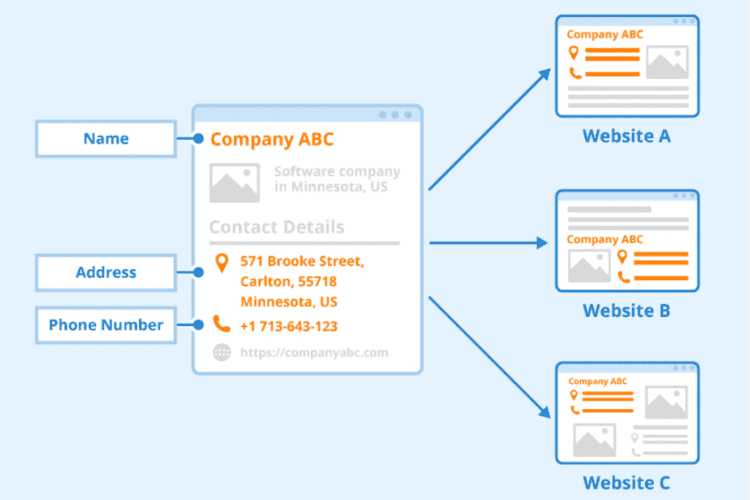
Another pitfall is mixed-up contact info. NAP stands for Name, Address, Phone. If your store’s name or phone number is spelled differently on different sites, Google gets confused.
Research shows even small errors in NAP can hurt local SEO. For example, if Yelp says “Main Street Cafe” and Google says “Main St. Cafe,” Google won’t trust which one is right.
Keeping the exact same NAP everywhere (website, listings, directories) is critical.
Managing separate Google Business Profiles
Each location should have its own Google Business Profile (GBP). But having a profile isn’t enough; you must keep it updated. One guide says each profile needs “correct hours, contact details, photos, and services”.
Outdated or incomplete profiles can confuse customers and hurt rankings. For example, listing the wrong opening hours in one city could make Google skip that listing.
In short, managing multiple GBP listings takes effort: set them up with the right info and update them if anything changes.
Step-by-Step Local SEO Strategy for Each Location
Here are clear steps to boost each branch’s local SEO:
1. Create Individual Landing Pages for Each Location
- Structure URLs logically. Give each store page its own address like /locations/city-name/ (for example, /locations/denver-west/). This is like giving each branch its own webpage “home.” Make sure the URL for Denver Highlands is different from Denver Downtown.
- Include unique, location-specific content. Describe what makes that branch special. Mention local staff, services, or neighborhood features. For example, talk about the park next to the store or an event in that city. Don’t just swap city names in one sentence. Google expects real local info and may ignore pages that all look the same.
- Embed a Google Map for that branch. Put the store’s Google Map on the page. This helps customers get directions right away and tells Google exactly where you are.
Unique, city-focused pages work best. Marketers find that pages tailored to a location rank much higher for local searches than generic pages.
2. Optimize Each Page for Local Keywords
- Target “[service] in [city]”. Use phrases people search for, like “coffee shop in Seattle” or “bakery in Austin.” Include these naturally in titles and text. This tells Google the page is about that area. For example, mention “We serve the neighbors of Midtown Houston” or “near the Elm St. park.”
- Use local schema markup (JSON-LD). In your webpage code, add the LocalBusiness schema with your store’s name, address, phone, and hours. Think of this as a label Google can read to verify your details. Each branch should have its own schema so Google matches it to the right listing.
- Mention local landmarks or events. Write about well-known places or local happenings near the store. For instance, “next to Riverdale Mall” or “served at the City Fair last summer.” This shows Google and customers you’re part of the neighborhood.
Tip: Each page should answer real questions people might have about that area (parking, busy times, etc.). This makes the page more useful than just a list of products.
Learn More about Local Landing Pages SEO: Best Practices for Single & Multi-Location Businesses
3. Claim and Optimize Google Business Profile for Every Location
- Ensure consistent NAP across listings. The business name, address, and phone must match exactly on your website, Google profile, and all citations. Even small differences (e.g., “St.” vs “Street”) can confuse Google.
- Upload unique photos for each branch. Add real photos of the store, staff, and products at that location. Google reports that businesses with photos get 42% more requests for directions and 35% more website clicks than those without. Unique images help customers trust each listing and boost clicks.
- Use location-specific business categories. Choose the relevant business category that best fits that branch. For example, if one location has a bakery and cafe, pick categories that reflect both. This helps Google show the right service in results.
Profiles that are fully filled out (with photos, hours, etc.) get about 7 times more clicks than empty ones.
- Submit each location to the directories. List each store in sites like Yelp, Bing Places, Apple Maps, YellowPages, and niche directories. Make sure the information is the same everywhere. These citations act like votes that your business is real in that city.
- Use a tool to manage citations. Tools like BrightLocal or Yext can speed up this process. They automatically push the correct NAP to dozens of sites at once. For example, you can tell BrightLocal your store’s info once, and it updates Apple Maps, Bing, etc. This ensures consistency and saves hours of work.
One SEO guide recommends syncing listings with tools like BrightLocal or Yext to avoid inconsistencies and boost local visibility.
5. Generate Location-Specific Reviews
- Ask for reviews on the correct GMB listing. Encourage happy customers to leave a Google review for the branch they visited. You can do this with signs in-store, email follow-ups, or a QR code on receipts. Make sure reviews go to the right location page (not a generic company page).
- Monitor and respond to reviews. Check new reviews often and thank customers for good ones or help with bad ones. Responding shows both Google and people that you care about customer experience.
Reviews influence trust and SEO. For instance, 71% of consumers say they won’t consider a business with an average rating below 3 stars. Also, businesses that reply to reviews are seen more positively by 88% of consumers.
6. Earn Local Backlinks
- Sponsor local events or charities. Supporting a community event (like a local sports team or food drive) often gets your business mentioned in news stories or on the event’s website. These local mentions act as backlinks for that branch.
- Get mentioned by local bloggers or news outlets. Reach out to local bloggers or newspapers with a story (e.g., a new menu item or charity work). A write-up in a local news site or blog adds a valuable local link.
Tip: Focus on truly local links. For example, a neighborhood newspaper or a city tourism site linking to your branch is more powerful than a random backlink. According to experts, local backlinks and sponsorships “help build credibility for every branch and improve your visibility” in that city.
7. Use Local Business Structured Data
- Add LocalBusiness schema for each location page. In your HTML or via Google Tag Manager, include JSON-LD markup with the business’s details (name, address, phone, hours, geo-coordinates). This is like giving Google a clear ID card for each store.
- Use @id and sameAs linking. In your schema, use @id for a unique identifier for each page and sameAs URLs (like your Google profile link). This helps Google tie together the page, the map listing, and social profiles as one business identity.
Proper schema markup boosts local visibility. SEO experts note that adding local business schema helps pages appear in map packs and knowledge panels.
Measuring how each branch does is key. Here’s how:
- Use UTM tags on GMB links. When you create “Visit Website” buttons or posts, add a UTM tag (like ?utm_source=google&utm_medium=maps&utm_campaign=CityA) for each branch. This way, Google Analytics will show you which branch’s link got clicked.
- Segment performance in Google Search Console. You can see search queries and clicks for each location page by using filters or separate properties (one property for each city page). This tells you what keywords drove traffic to each store.
- Create location-specific goals in Google Analytics (GA4). For example, set a goal for “Contact form submitted on Denver page” and another for “Seattle page.” You could also use call-tracking numbers per location to count phone calls as conversions. Tracking like this lets you see which branches are getting more calls or online leads.
Tip: Some SEO tools like BrightLocal or SEMrush Local can track keyword rankings for each office (e.g. “coffee in Denver” vs. “coffee in Austin”). They can also aggregate reviews and listings data per location.
Common Mistakes to Avoid
- Using one page for all locations. Don’t lump all branches on a single page. Google likes separate pages for each location. As one guide warns, using the same content everywhere is a mistake and may cause pages to be ignored.
- Keyword stuffing city names. Do not just pile up city names unnaturally. For example, writing “Our cafe Denver, Denver cafe, cafe Denver” many times can hurt your SEO. Instead, write naturally and use unique content per page.
- Forgetting mobile UX on location pages. Most local searches happen on phones. In fact, 60% of local searches start on mobile devices. If your pages load slowly or buttons are too small, you lose customers. Make sure each location page looks good on phones: use big buttons (like “Call” and “Directions”) and keep the site fast.
Conclusion: Turn Every Location Into a Local SEO Powerhouse
Treat each branch as its own little storefront on the web. Give every location a dedicated page, a filled-out Google profile, and the same correct address everywhere.
Collect local reviews and build links in each community. By being consistent and focusing on local signals, you build authority in every area.
As one expert summary puts it: “Start by making a page for every location, use the same business info everywhere, update your Google profiles and get real reviews… and your locations will show up higher and get more customers”.
With patience and tracking, each branch will shine in local search, bringing real customers through the door.