Ever wonder why some Google results make you click instantly? It often comes down to a short piece of text called a meta description. Think of it like a mini advertisement for your webpage.
If you run an online store or a local service, a good meta description can be the difference between a customer clicking your link or scrolling past to a competitor.
In this guide, you’ll learn in simple terms how to write meta descriptions that not only rank in search engines, but also sell – meaning they convince people to click and become customers.
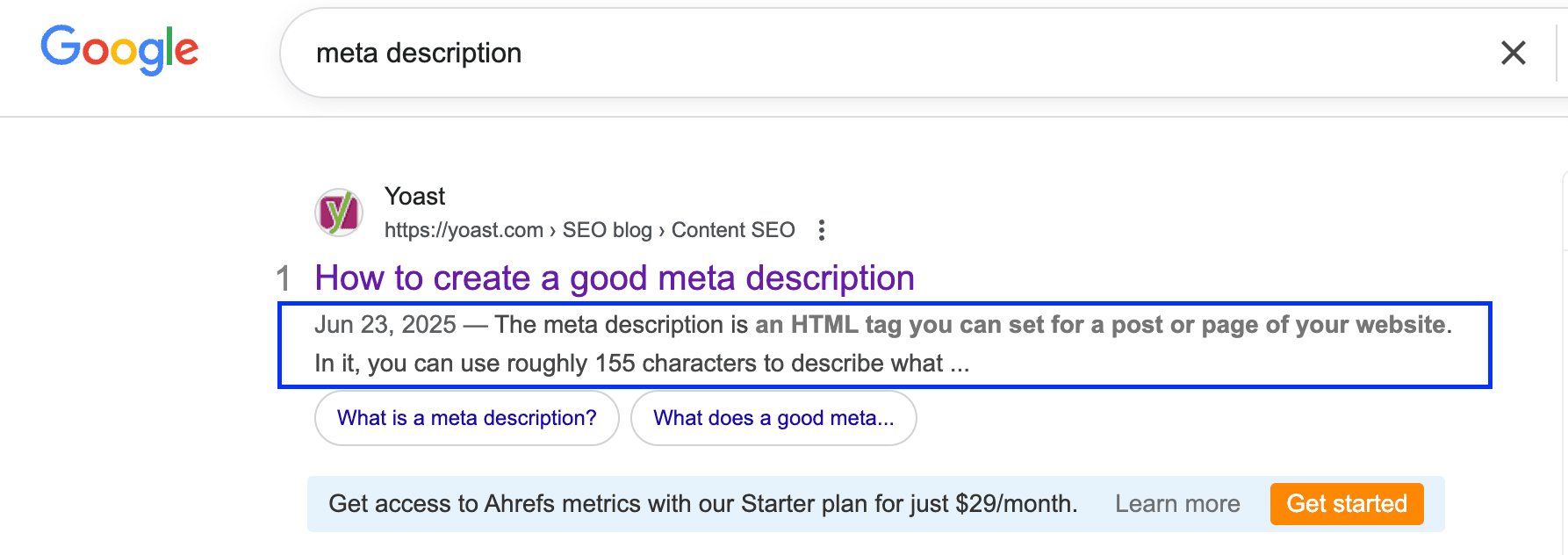
This image showing how meta description looks like for human

This image showing how meta description looks like for Algorithm
A meta description is the snippet of information shown below a page’s title (the blue link) on a search engine results page. Its purpose is to describe the content of your page to someone searching online.
In other words, it’s a brief summary (usually one or two sentences) of what users will find on your page.
For example, if someone searches for “best Italian restaurant in Springfield”, the meta description might read: “Authentic Italian cuisine in Springfield. Family-owned restaurant with homemade pasta and wood-fired pizzas – book a table now!”
Notice how the search terms can appear in bold within the meta description. This is Google’s way of showing the searcher that your page is relevant to what they typed.
The end goal of a meta description is simple: convince the searcher to click your link. It’s like a friendly wave inviting people into your website. When written well, it tells readers “Hey, this page has what you’re looking for!” in a compelling way.
Do meta descriptions really matter for SEO and sales? Yes – even though they don’t directly make your page rank higher on Google, they play a crucial role in attracting clicks.
Google’s own experts have confirmed that meta descriptions are not a direct ranking factor (they don’t influence where your page ranks in search results).
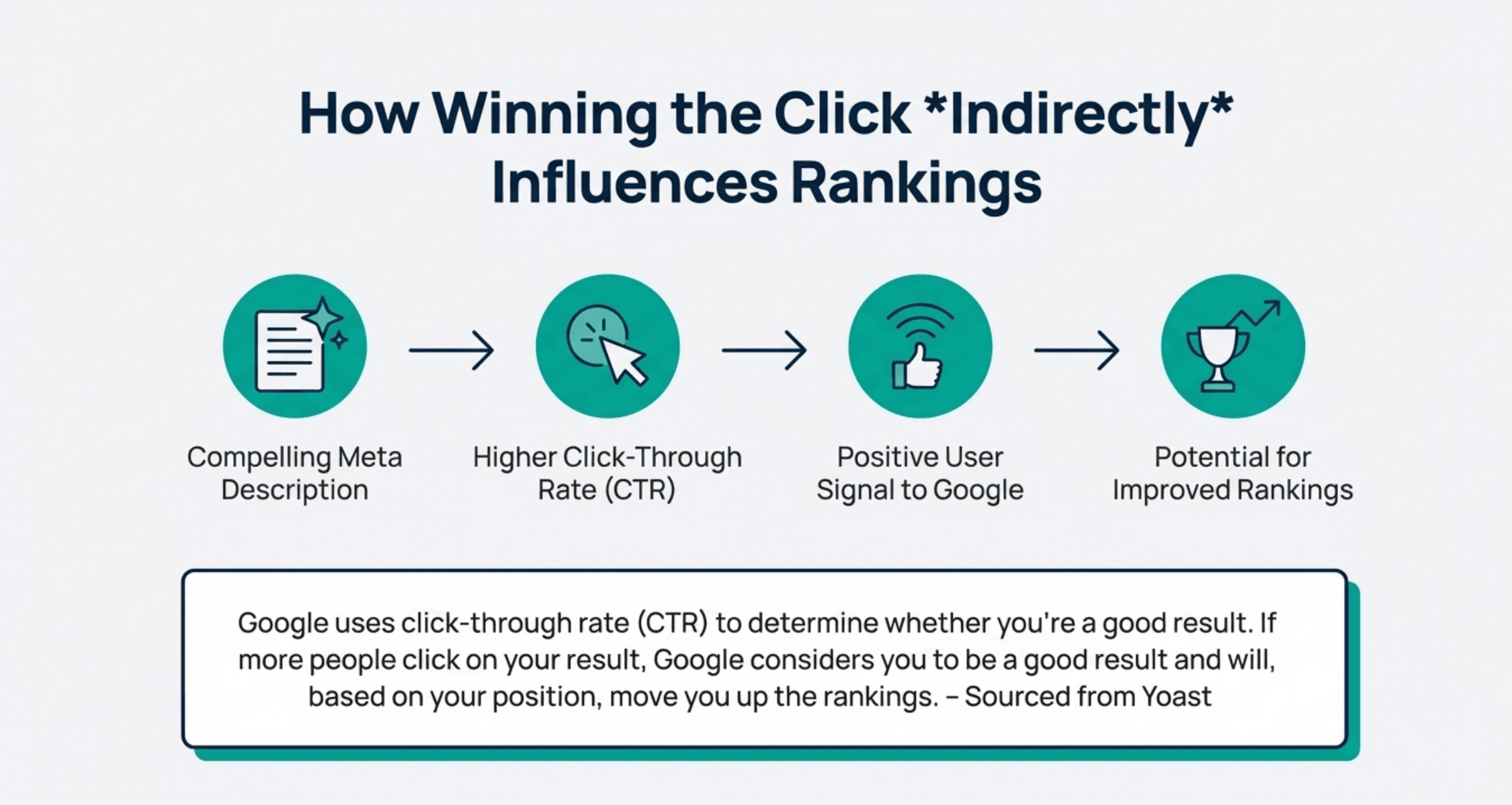
However, a well-crafted meta description can indirectly help your SEO by boosting your click-through rate (CTR) – the percentage of people who click your result after seeing it.
When more people click your link, it signals to Google that your page is a good result, which can positively impact your rankings over time.
Think of the meta description and title as your page’s “elevator pitch” on the search results page. You only have a few seconds to persuade someone to choose your result over the others.
A compelling meta description can be the difference between a user clicking on your website or your competitor’s.
An analysis by Backlinko found that pages with a custom meta description had a 5.8% higher CTR on average than pages that let Google auto-generate the snippet.
More clicks mean more visitors to your site – and for an e-commerce or local business, more visitors can quickly turn into more customers.
Also consider this: if your meta description is catchy and relevant, it can increase your organic traffic even if your page isn’t ranked #1.
You might be lower on the page, but people will be drawn to your snippet and click it.
It’s essentially free advertising space provided by Google. For example, a local plumbing service that includes “24/7 emergency service – free estimates” in its meta description might attract a lot more clicks than a higher-ranked competitor with a dull or missing description.
On the flip side, if you don’t write a meta description, Google will try to pick part of your page to display. That auto-generated text might not be very convincing.
As HubSpot notes, not including a meta description means missing out on the chance to personalize your message to potential visitors.
Why leave it to chance when you can craft the message yourself? (It’s like letting a random person pick your shop’s window display instead of doing it yourself.)
In summary, meta descriptions are important because they grab attention, build trust, and drive clicks – all of which are essential for turning searchers into customers.
Ready to write meta descriptions that not only inform, but also sell? Below are 10 practical tips to help you craft click-worthy meta descriptions.
We’ll break each tip down with simple examples (for both e-commerce products and local services) so you can apply them easily.
Remember, you’re writing for humans – helpful, clear, and even a bit exciting usually wins the click!
1. Keep it up to 155 characters:
Search engines typically show only about 155-160 characters of your meta description before cutting it off with “...”. That’s roughly a sentence or two. Keeping your description within this limit ensures your full message is visible.
For example, an online store might write: “Sports Watch – Water-resistant, 7-day battery, and free shipping.” This is concise (under 155 characters) yet informative.
If you go too long, your description will get truncated, which can look unprofessional or incomplete.
Aim for a brief summary that fits; think of it like a tweet-length pitch. (On mobile devices, even fewer characters may show, sometimes around 120, so shorter can be better.)
In short, be succinct and specific – pack the most important info at the beginning so even if something gets cut, the user sees the crucial bits.
2. Use active voice and make it actionable:
Write your meta descriptions in an active, engaging tone that speaks directly to the reader. Active voice means the subject is doing something (e.g., “Save money with our winter deals”) rather than being passive (“Money can be saved with our deals”).
Using active language makes your message punchier and clearer. It also naturally encourages action. For instance, a local bakery could say: “Treat yourself to fresh-baked goods – visit us today!” instead of a dull passive line like “Fresh-baked goods are available.”
Notice how the first version feels more inviting? Action words like “discover,” “get,” “enjoy,” or “unlock” can inspire the reader to click. You’re basically coaching the searcher on what to do next.
Keep the tone conversational and upbeat, as if you’re cheerfully guiding a customer: “You’re going to love what’s on this page, here’s why...” Remember, you’re talking to a real person, so make it lively and helpful.
3. Include a call-to-action:
Don’t be shy about adding a gentle call-to-action (CTA) at the end of your meta description. A CTA tells readers what they can do or what the next step is, which can create a sense of urgency or invitation.
Phrases like “Learn more,” “Shop now,” “Get a free quote,” or “Call today” are effective and straightforward. For example, an e-commerce meta description might end with: “50% off all winter coats – Shop now and save!” Similarly, a local service might say: “Expert plumbing in Springfield – Call now for a free estimate.” These CTAs encourage the user to click your link to accomplish something.
According to SEO experts, including a clear CTA in your snippet can increase your CTR by giving users a direct next step.
It’s like closing a sales pitch with a friendly “Come on in!” However, make sure the CTA fits your page content – if your page is a blog post, a CTA like “Read our guide” or “Find out how” may be more suitable than “Buy now”.
The key is to prompt action in a natural, helpful way. (Tip: Avoid generic CTAs like “Click here” – those don’t tell the user what’s in it for them. Instead, focus on the benefit: e.g., “Download your free checklist,” or “Reserve your spot.”)
4. Use your focus keyword:
Always try to include the main keyword or phrase that your page is targeting in your meta description. If you sell running shoes and your page is about “lightweight running shoes,” then work that phrase in, like: “Lightweight running shoes – run faster with our ultra-light designs.”
Why is this important? Because when the user’s search term appears in your meta description, Google will bold it in the snippet.
Those bold words catch the eye, showing the searcher that your page is directly relevant to what they want. Including the keyword also ensures your description stays on-topic and promises to address the user’s query.
For instance, a local dentist’s page targeting “emergency dentist Dallas” should use that phrase: “Emergency dentist in Dallas – relief for tooth pain with same-day appointments.”
This way, someone searching that term immediately sees a match in your snippet. Important: use the keyword naturally – don’t just stuff it repeatedly. One mention is usually enough.
The meta description should read like a human-wrote it (because a human is reading it!). So write a real sentence that happens to include the keyword. This makes your snippet both relevant and readable.
5. Show specifications, where possible:
If you’re writing a meta description for a product page or a specific service, include key details or specifications that matter to customers.
Think about what features or info would make someone say “Oh, that’s exactly what I need.” For an e-commerce product, that could be things like price, size, color, model, or other notable specs.
Example: “4K Ultra HD Smart TV – 55-inch display, $399, includes 2-year warranty.” In one sentence, the reader gets several important facts (size, price, warranty) which can entice them to click for more.
For local services, the “specs” are more about your service details: e.g., “CityName Heating & Cooling – 24/7 emergency service, licensed technicians, 5-star local reviews.” These specifics act as selling points.
They answer questions the user might have at a glance, building confidence that your page has the details they’re looking for. Including specs also helps qualify the click – meaning the right people click (because they see info they care about) and those who aren’t a match might skip (which is okay).
For instance, if your meta description for a laptop shows “16GB RAM, 512GB SSD, $899”, a shopper who needs those specs will click happily, while someone looking for a cheaper basic laptop might not – saving you a bounce.
In short, concrete details = credibility. They show you’re transparent and have exactly what you advertise.
6. Make sure it matches the content of the page:
This tip is super important: never trick users with a meta description that doesn’t reflect what’s actually on your page. Your meta description should be an honest summary or teaser of your content.
If people click your link expecting one thing and get something else, they’ll bounce right back to Google – and that’s not good for business or SEO. For example, don’t write “Free downloadable guide to DIY home repairs” if your page is actually trying to sell a service with no free guide.
Likewise, if you run a local salon and your page is about haircuts, don’t stuff it with unrelated keywords about hair products just to attract clicks.
Search engines are smart – Google often rewrites meta descriptions (in ~63% of cases) to better fit the query if your provided one isn’t relevant enough.
To encourage Google to use your version, ensure it accurately describes your page’s main topic and delivers on its promise.
One common mistake is to write a “bait” description (like a clickbait headline) that oversells or misleads – avoid this, because it can harm trust and Google might ignore your snippet altogether.
Instead, think like your visitor: does your meta description set the right expectation for what they’ll find? For instance, a blog post meta description might say, “Learn 5 simple exercises to relieve back pain at home, with step-by-step instructions.”
When the user clicks, that’s exactly what they should get. By being truthful and specific, you build credibility. Users will stay on your page longer because they found what was promised, which is great for user satisfaction (and likely for SEO too).
7. Make it unique:
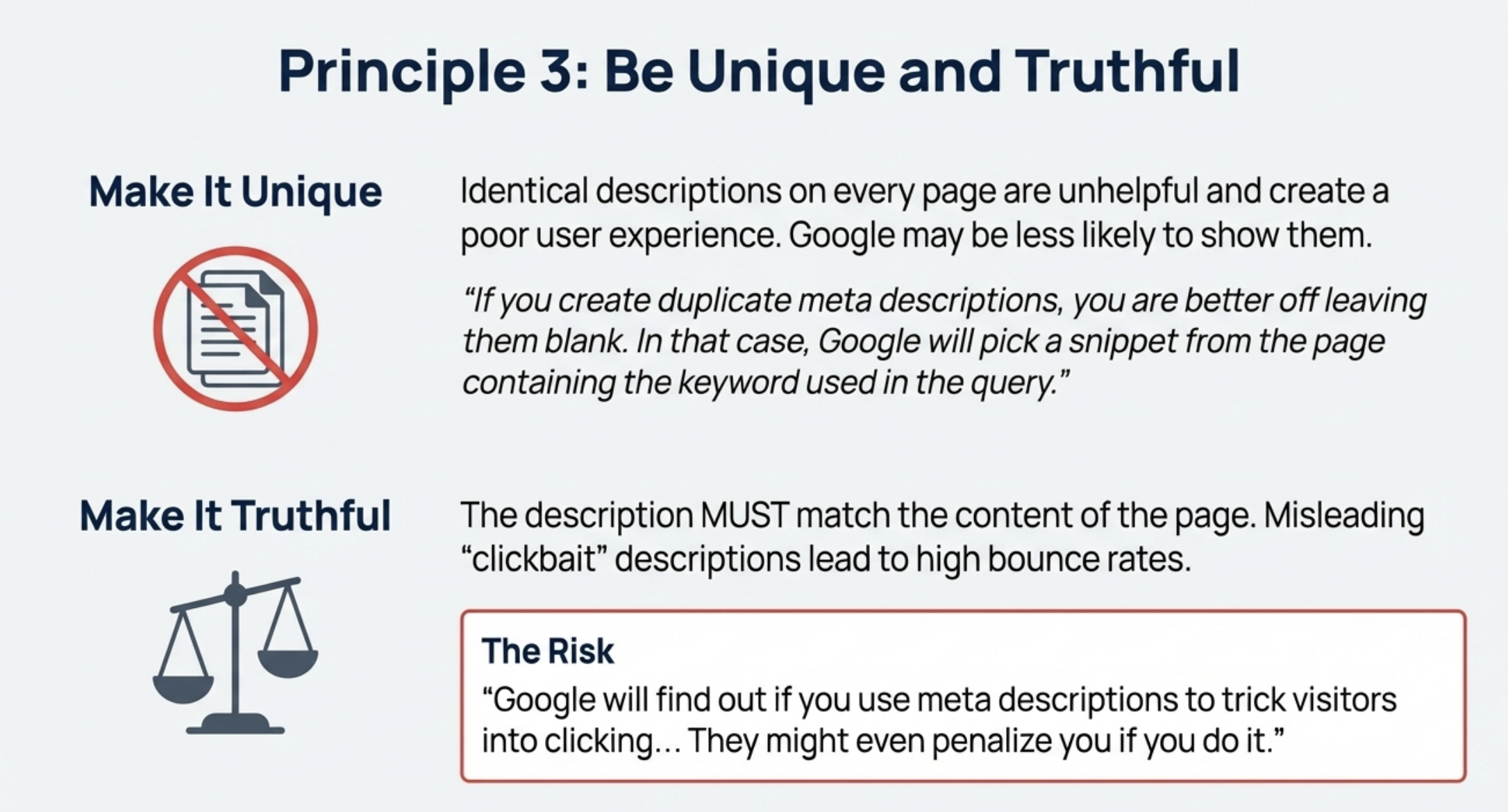
Make it unique
Every page on your website should have its own meta description that’s tailored to that page’s content. In other words, avoid using the same description on multiple pages (or a generic one for every page).
Why? Because if all your pages have the same bland snippet, they won’t stand out. Imagine searching for a product and seeing two results from the same site with identical descriptions – it looks copy-pasted and unhelpful, right?
Google might also see duplicate meta descriptions as a sign that you haven’t put thought into your pages. While Google typically won’t punish you outright for duplicate meta descriptions, it’s still bad for SEO and user experience.
Users could get confused seeing the same text for different pages, and they may skip your results. Additionally, you’re missing the opportunity to highlight what makes each page special.
For example, if you have an online store with 10 different products, don’t just use “Buy the best gadgets at XYZ.com” for all of them. Instead, write something specific for each product (its use, features, etc.).
Unique meta descriptions can improve your click-through rates because each page’s snippet will be more relevant to the specific search. Tools exist that can scan your site for duplicate meta tags, but a simple approach is to write a fresh one each time.
If you have a large site (hundreds of pages), prioritize important pages (like top products or services) for custom descriptions.
In a pinch, it’s actually better to have Google generate a snippet than to intentionally duplicate one – at least the generated snippet will pull from page-specific text.
Bottom line: take a moment to craft a unique pitch for each page. It shows professionalism and gives each page a better shot at catching the user’s eye.
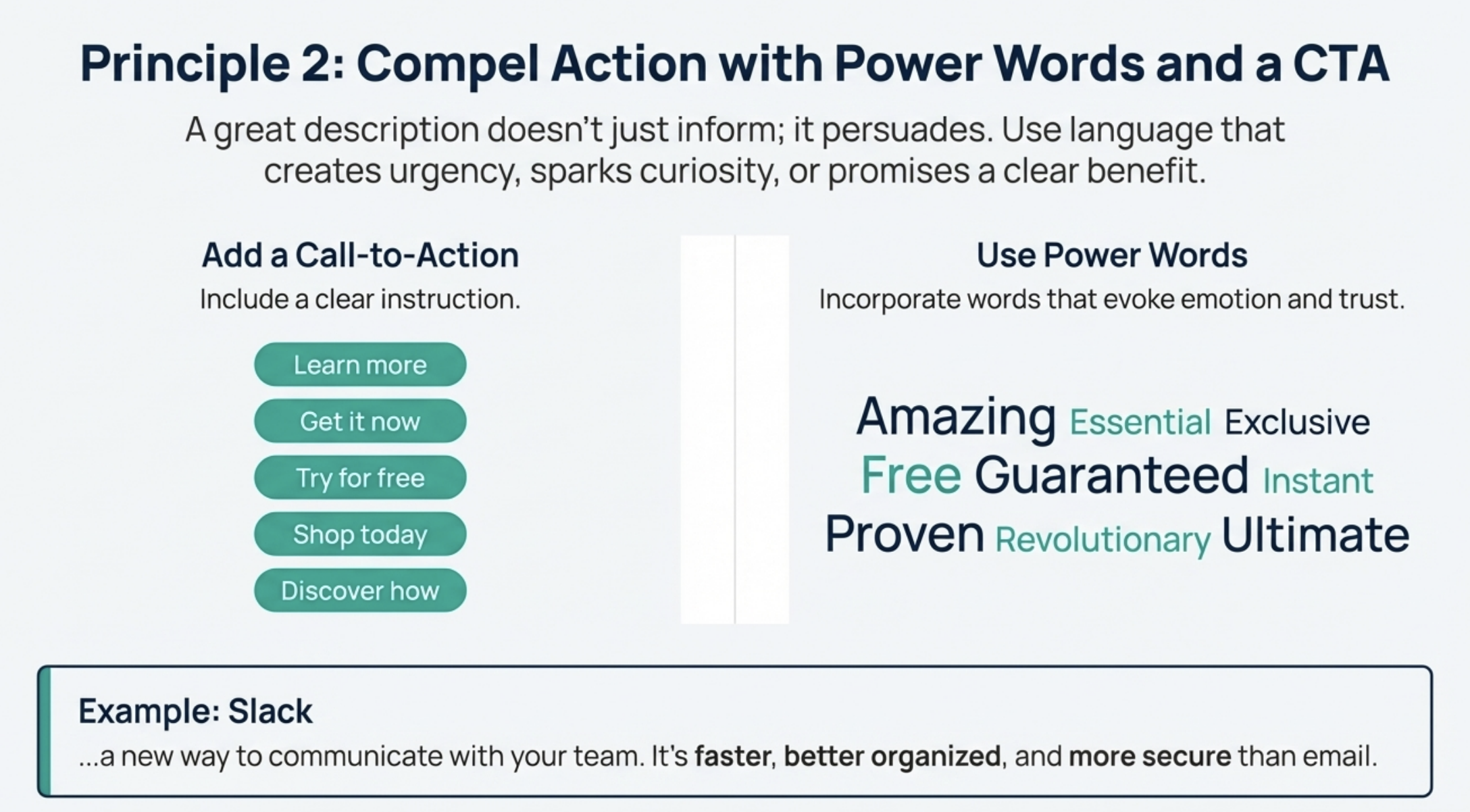
8. Add power words to capture emotions:
Add power words to capture emotions
Power words are emotionally charged or sensory words that can make your meta description more enticing. They tap into feelings and can subtly influence a reader’s desire to click.
For instance, words like “exclusive,” “limited-time,” “proven,” “easy,” “free,” “amazing,” or “guaranteed” can trigger excitement or curiosity.
Let’s say you run a local spa; a meta description could be: “Relax at our tranquil day spa – exclusive treatments and luxurious massages await. Rejuvenate your body and mind.” Words like “exclusive” and “luxurious” appeal to the emotions (feeling special and pampered).
For an e-commerce sale, you might use urgency power words: “50% off all laptops this weekend – limited time offer, don’t miss out!” Terms such as “limited time” or “don’t miss out” create a sense of urgency and FOMO (fear of missing out).
Be careful, though: use power words in moderation and sincerely. They should fit the tone of your business and the truth of your offer. Too many hype words can make a description sound like spam or clickbait.
One or two well-chosen power words can spice up your snippet and make it emotionally appealing. In fact, studies in marketing have shown that using emotionally resonant words can improve engagement and CTR.
People are not robots; a bland description like “We sell shoes in sizes 6-12” might be factual, but it doesn’t excite anyone. Compare it to: “Step into comfort with our best-selling running shoes – free shipping on all orders!”
This version uses “best-selling” (implies popularity and trust) and “free shipping” (everyone loves free) – far more compelling.
Think about the core emotion or benefit of your page and sprinkle in a word that amplifies it (e.g., “delicious” for a restaurant, “expert” for a service, “handcrafted” for products, etc.).
The goal is to make the reader feel something positive – whether it’s urgency, curiosity, trust, or excitement – when they see your meta description.
9. Use numbers and statistics when relevant:
Numbers naturally draw the eye and add credibility. If you can include a specific number or statistic in your meta description, it often makes your snippet more intriguing and trustworthy. Our brains are attracted to digits in a sea of text. For example, which sounds more convincing: “Save money on car insurance” or “Save $300 on car insurance”?
The one with $300 stands out and feels tangible. In a local service context, you might say: “Trusted by over 500 families in Denver – HVAC repairs done right, 24/7.” The “500” here signals that many people trust this business, which builds confidence.
An e-commerce product might use: “Rated 4.8/5 by 1,200 customers – this blender packs 1200W of power for perfect smoothies.” Here we snuck in a rating and the wattage as numbers. These details can boost your credibility at a glance.
If your business has impressive figures, flaunt them: years in business, number of clients served, awards won (e.g., “#1 Realtor in Cityname 2023”), percentage discounts (20% off), inventory counts (“Only 3 left in stock!”), etc.
Even using list numbers can help; a blog post might say “Top 10 tips...” which can attract list-loving readers. According to copywriting experts, incorporating data or numbers can increase engagement because it provides concrete information.
Just ensure any number you use is relevant and accurate. Don’t randomly throw “100%” or “#1” unless you can back it up – misleading stats can backfire (and harm trust).
But if you have a really impressive stat or offer, definitely put it out there in the meta description. It could be the quick fact that convinces someone to click your link out of all the others.
10. Highlight unique selling points:
Ask yourself: “What makes my page, product, or service different or better than the rest?” Whatever your unique selling point (USP) is, make sure your meta description highlights it.
This is how you sell through the snippet. It could be something about quality, price, convenience, experience, guarantee, etc. For a local business, maybe it’s “family-owned since 1990” or “certified technicians” or “voted best pizza in town”.
For an e-commerce site, it could be “free returns,” “2-year warranty,” “handmade craftsmanship,” or “exclusive to our store.” These are the little gems that set you apart from competitors.
For example: “Premium organic coffee beans – fair-trade, locally roasted daily for the freshest flavor.”
“Locally roasted daily” is a selling point that coffee lovers might find appealing and unique.
Another example: “Lawn Care Services – 100% satisfaction guarantee, or your money back.” That USP (satisfaction guarantee) can instill trust and win the click from someone who worries about quality. The idea is to give the searcher a compelling reason to choose you. If your page is a blog post or informational article, the USP might be the value it offers: “Comprehensive guide to DIY solar panels – step-by-step instructions and cost breakdown.”
Those specifics (“step-by-step” and “cost breakdown”) are selling the usefulness of your article. Keep in mind, you might have multiple selling points, but you can’t list everything in one short meta description.
Pick one or two of the strongest, most relevant ones and feature them. Think: “What is the biggest benefit a user will get from my page?” and lead with that.
As Backlinko’s SEO guide puts it, focus on the value that sets your page apart. When users see something in your snippet that they don’t see in others (like a special offer, a unique feature, an award, etc.), it can really increase their curiosity and trust, leading to more clicks.
By following these 10 tips, you’ll create meta descriptions that aren’t just bland summaries, but persuasive mini-ads for your content. Each one will be doing a little extra work to sell your brand, product, or service to potential visitors.
Now that you know the tips, let’s also look at some pitfalls to avoid – because knowing what not to do is just as important.
Common Mistakes to Avoid While Writing a Meta Description
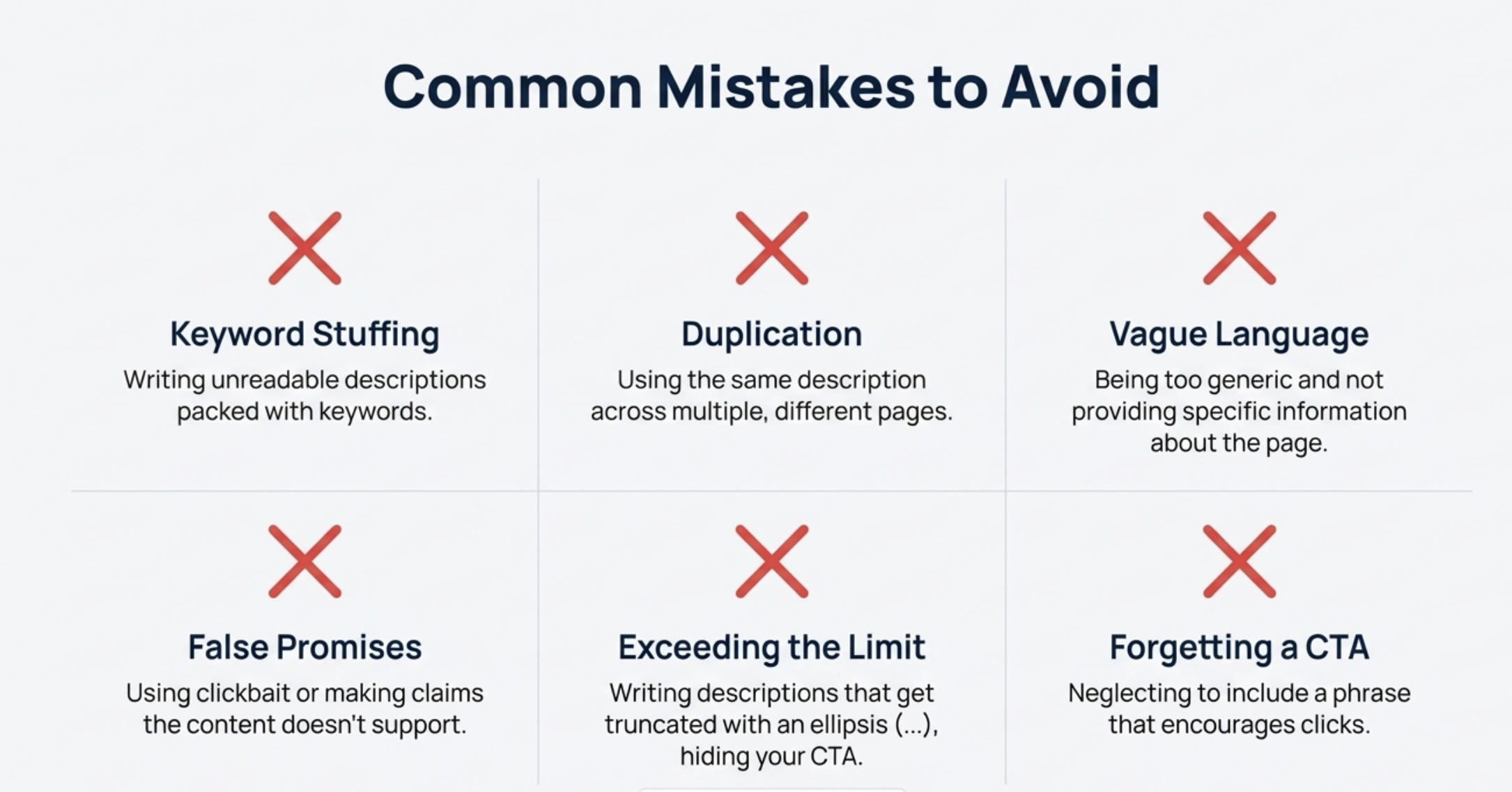
Even well-intentioned writers can slip up on meta descriptions. Here are some common mistakes you should steer clear of:
- Writing meta descriptions that are too long or too short: If it’s too long (beyond ~160 characters), it will get cut off, leaving an incomplete thought. If it’s extremely short or vague (“We sell great products.”), It doesn’t give enough info to entice a click.
Stick to that sweet spot of providing a concise but meaningful summary. As Yoast’s SEO experts say, keep it up to 155 characters for the best results.
- Using the same meta description for multiple pages (duplicate snippets). This is a big no-no. It’s a missed opportunity and can look lazy. Every page should have its own unique description.
Duplicates don’t help the reader or your CTR – people will tune out if they see the same text repeated. If you can’t come up with something unique, it’s actually better to leave it blank and let Google pick a snippet than to copy-paste the same one everywhere.
- Stuffing keywords or writing for search engines instead of people. Cramming a bunch of keywords or repeating your focus term over and over makes the description hard to read and off-putting.
Remember, Google does not use the meta description for ranking, so stuffing it with keywords won’t boost your rank, and it might actually turn humans away (lowering your CTR). Write naturally and prioritize clarity and appeal over trying to mention a keyword five times.
- Being misleading or overly “clickbait-y.” Don’t promise something in the meta description that your page doesn’t deliver – it will just annoy users and hurt your reputation.
Also, extreme exaggeration like “Literally the best in the universe!!!” with multiple exclamation points can seem spammy. It’s fine to be enthusiastic and use power words, but stay truthful and reasonable.
Avoid “deceptive” tactics; as one study notes, if you engage in deliberately deceptive meta descriptions, users will quickly bounce, and Google might even ignore your meta tag altogether. Build trust with accurate previews of your content.
- Leaving meta descriptions blank on important pages. Not writing a meta description at all means you surrender control to Google’s algorithms to pull some text from your page. While Google’s auto-generated snippets can sometimes be okay, they often won’t be as compelling as a custom-crafted one.
An empty meta description is a missed chance to market your page. So at least for your homepage, main product pages, and key service pages, always fill in a good meta description.
If you have dozens of less important pages, it’s understandable to skip some, but prioritize the pages that matter most for your business.
- Using meta descriptions for every page when not necessary. (This one’s a bit nuanced.) If you have pages that are not meant for search audiences (like a login page or a trivial archive), you don’t need to force a meta description there.
Sometimes, letting Google decide or even using a noindex for such pages is fine. Focus your effort on the pages that you do want people to find and click.
In summary, avoid shortcuts and keep the user’s experience in mind. A good meta description practice is about balancing keyword relevance with human-friendly, enticing copy. By dodging the mistakes above, you’ll ensure your meta descriptions work for you, not against you.
Conclusion:
Crafting meta descriptions might seem like a small detail, but as we’ve explored, it’s a powerful one.
By writing clear, engaging, and honest meta descriptions, you help searchers understand why your page is worth their time – and that’s the first step in winning new visitors and customers.
So next time you create or update a page on your website, give that little snippet some love.
Ask yourself: “If I saw this in Google, would I click it?” With the tips and advice from this guide, you’re well on your way to saying “Yes!” to that question and getting more clicks that turn into sales.
No, at least not directly. Google has stated that it does not use meta descriptions in its ranking algorithm. This was confirmed by Google’s Search Advocate John Mueller, who explained that meta descriptions are primarily used for the snippet in search results and not as a signal for where to rank your page.
In plain terms, stuffing your meta description with keywords won’t boost your position on Google. However, meta descriptions can have an indirect effect on SEO. How? By improving your click-through rate (CTR).
A compelling meta description can attract more clicks, and if your page gets significantly higher CTR than others in the same position, it’s a positive sign. Google watches how users interact with results.
If more people click your result because of a great description, it could lead to better rankings over time since it indicates to Google that searchers prefer your page.
So think of the meta description as not a ranking factor, but a ranking helper – it helps you get the traffic your ranking deserves, and more traffic/engagement can loop back into improved ranking.
The main takeaway: Write meta descriptions for humans (to get clicks), not for Google’s algorithm. The algorithm doesn’t count your words, but the humans do.
How Winning the Click *Indirectly* Influences Rankings
If you don’t write one, Google will automatically generate a snippet for your page. Usually, it takes a chunk of text from your page that it thinks is relevant to the query. This snippet might be part of a sentence surrounding the keyword on your page. Sometimes it’s okay, other times it might look weird or cut off.
For example, if the first line of your page is navigation or a cookie notice, Google might grab that, which isn’t ideal.
According to HubSpot, if you don’t include a meta description, Google will display a snippet from the page’s content, often from the first paragraph (with any matching keyword in bold).
This isn’t necessarily terrible – your page might have a decent first sentence – but you’re missing out on the chance to customize the message to users.
Keep in mind that even if you do write a meta description, Google doesn’t always use it. In fact, Google rewrites or ignores provided meta descriptions about 63% of the time! That usually happens when your description isn’t seen as a good match for the user’s query.
Google will then pick something from the page it thinks is more relevant. Also, about a quarter of top-ranking pages don’t have a custom meta description at all – they rely on Google’s automatic snippet.
So not writing one doesn’t doom your page, but it’s not recommended for your most important pages. By writing a good meta description that matches your content and covers probable search terms, you increase the odds that Google will use it.
If you leave it blank, you have zero control. As a best practice, write a meta description for each important page (especially those targeting competitive or specific keywords) to put your best foot forward. For less critical pages, it’s less urgent.
In short: if you don’t write a meta description, Google will do it for you – and its version may not be very enticing. It’s like having the phone company create your business listing message instead of crafting your own slogan.
You generally can do a better job than an algorithm snippet, so try to provide one when it counts.
Including your brand name in your meta description is optional and depends on how well-known or relevant your brand is to the searcher. The primary goal of a meta description is to get a click by telling the user what’s in it for them.
If your brand name is very recognizable or carries trust, adding it can help attract clicks (some people might specifically look for your brand).
For example, “XYZ Electronics – 2-Year Warranty on All TVs, Free Shipping.” Here, starting with the brand might instill trust for loyal customers or those who’ve heard of XYZ. On the other hand, if you’re a small or new business that people aren’t actively searching for by name, including the brand at the beginning might just use up precious characters without adding incentive.
An SEO rule of thumb is: use the brand name if it likely makes a user more inclined to click; if not, you can omit it.
Many sites include the brand at the end of the meta description or title, separated by a pipe or dash (especially big brands).
For example: “Affordable wedding photography in Seattle – capture your day beautifully. | Sunburst Studios.”
This way, the description leads with the service/value, but still mentions the brand for recognition. If someone searches your brand specifically, Google might show the snippet anyway, and seeing the name could reassure them it’s the official page.
For homepage meta descriptions, it often makes sense to mention your brand since that page represents your whole site (e.g., “Welcome to Acme Corp – …”). But for a generic blog post or a product page, focus on the product/service first.
In summary, including your brand is not mandatory, and it doesn’t directly improve SEO, so use it strategically. If it fits and you have space, go for it.
If you’re tight on characters or your brand is unknown, it’s okay to leave it out and use those characters for something more compelling.
One answer on a Google forum put it well: If your brand name would make someone more likely to click your listing, use it. If not, don’t.
There’s no fixed schedule for updating meta descriptions – you should update them when it makes sense. If the content of your page changes significantly, you should update the meta description to reflect those changes.
For example, if your product now has a new feature or a different price, or your blog post was updated for a new year, update the snippet accordingly so it’s accurate and up-to-date.
If you’re running a limited-time promotion, you might update the meta description to mention it, then change it back after the promotion ends.
For pages with evergreen content (content that doesn’t really change, like a timeless how-to article or your About Us page), you might not need to touch the meta description for a long time once it’s good.
One guideline suggests that if content doesn’t change often, reviewing meta descriptions once or twice a year is enough – mainly to ensure they’re still relevant and to maybe tweak for performance.
It’s a good idea to monitor your pages’ CTR in Google Search Console. If a page has a decent ranking but a low CTR, that’s a sign your meta description or title might need improvement. You can try updating it to be more compelling and see if CTR increases over time.
Avoid changing meta descriptions too frequently without a reason. If you change them too often (say every few days or weeks) for no real content change, you might confuse search engines and users.
Frequent unnecessary changes could also reset any learning Google has on how that snippet performs. So, make changes intentionally and then give it time to measure impact.
Also, note that if Google is consistently overriding your meta description (showing a different snippet), you might experiment with rewriting it to better match common search queries. But if you’re happy with the CTR and accuracy, there’s no need to keep tinkering.
Update your meta description when your page’s content or offer changes, or when you identify an opportunity to improve CTR.
There’s no need to constantly refresh it if nothing has changed. Quality and relevance are more important than freshness in this case. As one source puts it: don’t change it so often that you “confuse search engines and users” – only when it’s necessary and beneficial.
Yes, you can use emojis (and other special characters) in your meta descriptions – Google will typically display them if they are relevant and properly encoded.
Emojis can make your snippet stand out visually because they add color and symbols to an otherwise text-only block.
For example, a meta description for a local pizzeria might include a 🍕 emoji to grab attention: “Authentic Italian Pizza 🍕 – wood-fired, made with fresh ingredients.
Order now for fast delivery!” Seeing that little pizza icon could catch a pizza-lover’s eye. Google has stated that adding emojis to titles or descriptions is allowed and won’t hurt your ranking (they don’t count as a special ranking factor).
However, a few caveats:
- No direct SEO boost: As mentioned, emojis don’t give you an SEO boost by themselves. They’re just for user appeal. Use them to possibly improve CTR, not for ranking signals.
- Display can vary: Google will show emojis in search results if it thinks they’re relevant and helpful. If the emoji looks out of place or spammy, Google might ignore or “strip” it out.
For instance, using a ✔️ or ⭐ might show, but an overly decorative or unrelated emoji might not. Also, different devices render emojis differently (some in color, some in black and white, some not at all). Most modern systems handle them fine, though.
- Use relevant emojis sparingly: One or two well-chosen emojis can enhance your snippet; too many can look gimmicky or like spam. Imagine a meta description full of 🔥🎉😍 – it might turn people off or look unprofessional for certain businesses.
Choose an emoji that reinforces your message (like a ✅ check mark for “certified” or “quality assured”, a ⭐ star for ratings, a 🚚 truck for delivery, etc.). For a fun brand or a blog post, playful emojis can work; for a serious law firm page, probably not.
- Test it out: If you add an emoji, search for your page (or use the Rich Results Test) to see if it’s showing up. If not, Google may have filtered it. For instance, early experiments found that Google sometimes filtered out emojis in titles if deemed not relevant.
Emojis can indirectly help because if they draw the user’s attention, you might get more clicks. Some marketers believe emojis improve CTR because they make your result visually different from others (a little burst of color or symbol).
Just remember that the emoji should enhance understanding, not confuse the reader. A little green checkmark (✅) might convey “this is good/trusted”.
Keep it relevant and don’t overdo it. It’s one more tool to potentially capture attention and delight the user even before they click. And a delighted user is more likely to become a customer!
If you have any questions regarding the meta description, then please contact me for free at: bikashyadav810@gmail.com
More resources:
How to create a good meta description
How to Write Meta Descriptions | Google Search Central
Meta Description: What It Is & How to Write One
How Google Wants You to Create Meta Descriptions