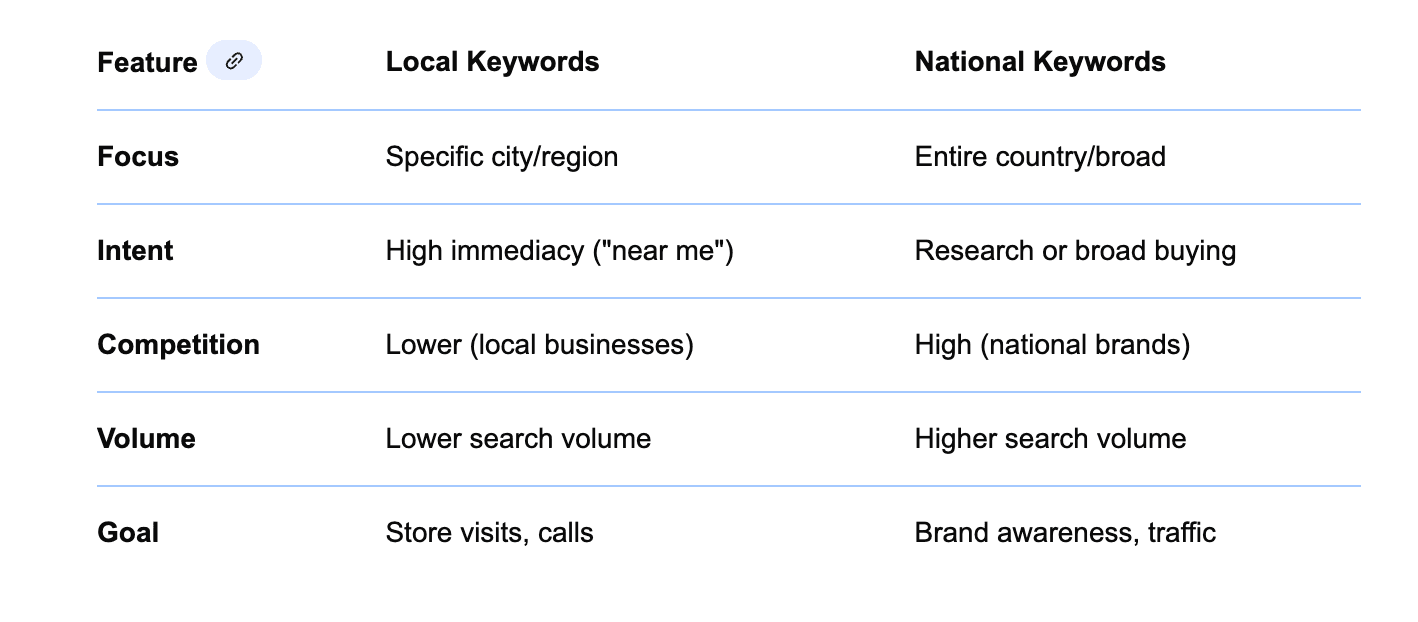
Local SEO means tailoring your website to attract nearby customers. Nearly half of all Google searches have local intent, making “service + city” searches crucial for service businesses.
Properly optimized local service pages ensure you appear when locals search for your offerings, turning browsers into buyers. In fact, about 76–88% of mobile “nearby” searches result in store visits or purchases within a day.
With so much high-intent traffic available, optimizing your service pages for local search can dramatically boost leads.
Why Local SEO Matters for Service Pages?
Local search drives foot traffic and calls. For example, 80% of U.S. consumers search online for local businesses weekly. Over 60% use sites like Google and Yelp to research unfamiliar businesses.
In local queries, the Google map pack attracts 42% of clicks, and 72% of consumers start with Google for local info. Ignoring local SEO means missing these prospects: one report found 58% of companies don’t even optimize for local search.
Meanwhile, 62% of customers avoid businesses if online info is incorrect. In short, service pages tuned to local search capture huge, ready-to-buy audiences.
What Local SEO Is (Brief Overview)?
Local SEO optimizes content for geographically relevant searches. It’s about using location-based keywords (city, neighborhood, “near me”), managing your Google Business Profile, and earning local links.
Because roughly 46% of searches have local intent, search engines show local results (map packs, local directories) prominently. Local SEO ensures service pages signal their relevance to a region.
In practice, this means including the service area in titles, tags, and content, keeping contact info consistent, and earning citations and reviews, so that Google knows where you serve.
How Local SEO Impacts Service-Based Businesses?
Local searches convert incredibly well. Studies show that about 78%–80% of local-mobile searches end in an offline purchase. One analysis found that half of smartphone local searchers visited a store within 24 hours. In other words, local queries often signal an immediate need.
For service businesses, home services, clinics, and more, this translates to more calls and appointments. For instance, Pret A Manger saw 40% more Google Maps views and 19% more direction requests after optimizing for local queries.
Simply put, well-optimized local pages connect you to customers who are ready to buy.
Common Mistakes with Local Service Pages
- Lack of Local Focus: Many pages target general services without location terms. In fact, about 58% of companies still don’t prioritize local SEO, meaning they miss high-intent traffic.
- Incorrect or Missing Info: Businesses often list inconsistent addresses or hours. This isn’t just sloppy – 62% of people avoid a business if they find wrong info online.
- Sparse Content: Some service pages are thin or duplicate generic service descriptions. Without unique, local content, they won’t rank well.
- Ignoring Mobile: Pages that aren’t mobile-friendly lose over half their traffic potential, since 57% of local searches happen on mobile devices.
- Neglecting Reviews: Overlooking reviews is costly. About 71–78% of consumers won’t consider businesses rated below 3–4 stars. Service pages without visible testimonials miss trust signals that local customers seek.
Each of these mistakes can be fixed by focusing on localized content, consistent data, and user experience.
The foundation of local SEO is finding the service + location keywords your customers use. Start by brainstorming terms like “[service] [city/neighborhood]” or “[service] near me.” Use tools (Google Keyword Planner, Ahrefs) to see which city modifiers get search volume.
For example, “near me” queries grew 900% in recent years, highlighting how people specify location. Balance broader terms (“plumbing services”) with geo-modifiers (“plumber in Denver”). Because 46% of searches are local, omitting location from keywords wastes clicks.
How to Find Geo-Specific Keywords?
- Use Google’s autocomplete (type your service + a city) and tools like SEMrush to discover city-targeted phrases.
- Look at Google’s “People also ask” for local variants.
- Check competitors’ content for local keyword ideas.
Build a list combining services (e.g., “heating repair”) with locations (city, borough, “near me”).
Balancing Service + Location (Keyword Structuring)
Structure keywords to reflect real queries, like “[service] in [city]” or “[city] [service] company.” Make sure each service page has a clear focus.
For example, instead of targeting just “landscaping,” use “landscaping services in Austin” if you serve Austin. This leverages the 46% local intent data. Also consider neighborhood names and zip codes where relevant.
Keyword Placement Tips for On-Page SEO
- Title & Headings: Use the main city-service keyword in the H1 and H2.
- Body Content: Naturally include location and service throughout paragraphs. Avoid keyword stuffing – aim for readability.
- URL and Meta Tags: Incorporate the city name in the URL slug and meta title.
By systematically integrating geo-keywords, you ensure search engines understand where your services apply.
Title tags and meta descriptions are your shop window in search results. They should include both the service and location to attract local clickers. For example, a title like “Emergency Plumber in Chicago – 24/7 Service” signals locality and urgency.
Well-crafted titles directly impact clicks: studies show the #1 search result can command about 32% CTR on desktop. Including a city or “near me” can boost relevance.
Similarly, meta descriptions should highlight local benefits and a call-to-action (CTA). Though Google doesn’t use meta text for ranking, it influences click-throughs. Mention city landmarks or trust signals (e.g., “NYC locals’ top choice”) to appeal to local searchers.
- Keep titles around 50–60 characters so the city name isn’t cut off.
- Format example: “[Service] [City] – [Unique Selling Point]”.
- Always front-load the important part (service and location first).
Since nearly one-third of searchers click the first link, a clear, localized title can help you rise in rankings and clicks.
- Use the description to expand on what the title promises.
- Mention locality again (neighborhoods or “near [landmark]”).
- Include a CTA like “Call today” or “Book online now.”
- Aim for ~120–155 characters.
A compelling, location-focused snippet can lift click-throughs even if competitors have higher ranks.
Step 3: Use Location-Specific Content Strategically
Beyond keywords, your page content should sound local. Mention nearby landmarks, events, or neighborhoods to connect with locals. For instance, a home-cleaning page could reference cleaning in “downtown Parkview” or serving “uptown festival attendees.”
This signals to Google and visitors that you’re part of the community, not a faceless brand.
Include unique details like “serving clients from [Local Park], [Town Hall area], and [Suburb Name]”. Such specificity can set you apart from generic pages.
When Pret A Manger optimized for local search intent, it got a 40% surge in views and 19% more direction clicks – proof that hyper-local content works.
Mentioning Local Landmarks, Events, or Neighborhoods
- Reference known locations or annual events your customers attend.
- If you service multiple areas, consider separate subpages for each (e.g. “[Service] in [Neighborhood]”).
- Use phrases like “serving the [Neighborhood] community” in intros.
Even small nods like “located 2 blocks from [Landmark]” help searchers and Google understand your footprint.
Local Trust Signals: Awards, Reviews, and Community Involvement
Trust signals build local credibility. Show awards (“Voted Best Plumber 2023 in [City]”), local affiliations (Chamber of Commerce badge), or community involvement (“Sponsor of [City] Little League”). These can sway users and signal authority.
Online reviews are critical trust signals: 83% of consumers use Google to find local business reviews. Displaying recent 4–5 star reviews on your service pages (or aggregating review widgets) boosts confidence.
In fact, studies suggest businesses showing rich snippets (like star ratings) get 58% of clicks, versus 41% for plain results. Embedding testimonials and awards on the page itself (with Schema markup) can also make your snippet more eye-catching in search.
Step 4: Structure Your Page for SEO and UX
A clear structure helps both search engines and visitors. Use one H1 (your page title) with your keyword and location, and section the content with H2/H3 headings for readability. This hierarchy is crawl-friendly and user-friendly.
For instance, a good H2 might be “Why [Service] Matters in [City]” or “Our [Service] Process in [Neighborhood].”
Interestingly, a test showed that removing all heading tags caused traffic to drop ~3.5% and time-on-page to plunge by 12%. This suggests that logical headings (and readable text sizes) keep users engaged. Well-structured pages tend to keep visitors longer, indirectly boosting SEO.
Using H1–H3 Properly for Readability and Indexing
- H1: Only once, containing the main service and location.
- H2: Use for main sections (benefits, services, FAQs). Insert secondary keywords naturally (e.g., “Emergency [Service] in [City]”).
- H3: For subpoints within sections.
This not only aids Google’s understanding but also helps readers skim. Short paragraphs (3–5 sentences) under each heading make the page skimmable and improve on-page time.
Internal Linking to Relevant Service or Location Pages
Link related pages to each other (and to your blog) using relevant anchor text. For example, your main “Plumbing in [City]” page might link to a “Water Heater Repair” subpage.
Internal links help distribute “link juice” and keep visitors navigating your site, a positive UX signal. They also help search engines index deeper pages. Ensure your menu links to all major service areas/pages (e.g., “[City] Services” dropdown).
Embedding Maps or Service Area Visuals
An embedded Google Map of your location (if you have a storefront) or a service-area map graphic reassures users they’re in the right place. Seeing your actual location or highlighted service radius can increase trust. It also provides local relevance cues to Google.
Even without a physical store, a stylized map image or infographic (e.g., service radius) can visually reinforce locality. If you have multiple locations, consider a “Find Us” section with a map and addresses.
Step 5: Add Local Business Schema Markup
Schema markup is structured data code that tells search engines details about your business. For local service pages, using LocalBusiness or Service schema can include your name, address, phone, service offered, hours, and reviews in a standardized way.
What It Is and Why It Helps
Schema doesn’t directly boost rankings, but it unlocks rich snippets and can improve click-through rates. Google reports that 72.6% of first-page results use schema, and businesses with schema often see around 40% higher CTR.
Rich snippets like star ratings or service listings stand out: one study found 58% of users clicked on schema-enhanced results versus 41% on regular listings.
By adding the LocalBusiness schema, your service page can show operating hours, pricing, review stars, etc., in the search results, attracting more clicks from local searchers.
Key Markup Elements for Service Pages
Include schema tags for:
- Business Info: Name, address, phone (NAP), hours, logo.
- Service Offered: Define the service or category (e.g., “PlumbingService” or “Carpentry”).
- Area Served: If using the LocalBusiness schema, specify the serviceArea or geographicRadius.
- Reviews & Ratings: AggregateRating and reviewSchema to show star ratings.
- Offers: If applicable, usethe Offer schema for pricing or promotions.
Using JSON-LD (preferred by Google), embed this in the HTML header. Tools like Google’s Structured Data Testing Tool or Schema App can verify correct implementation.
Step 6: Encourage and Showcase Local Reviews
Online reviews heavily influence local SEO and conversions. Positive reviews signal trust to Google and prospects.
Encourage customers to review you on Google, Yelp, Facebook, etc. Since 83% of people search for reviews on Google, ensuring you have a steady flow of five-star reviews on your Google Business Profile is critical.
Where to Collect Reviews (Google, Yelp, etc.)?
- Google Business Profile (GBP): Most important; reviews here show up on Google Search/Maps.
- Yelp/Industry Sites: Sites like HomeAdvisor (for home services) or TripAdvisor (for travel services) matter in specific niches.
- Social Platforms: Facebook reviews and Nextdoor can also show up in local searches.
Ask satisfied clients via follow-up email to leave reviews, and make it easy by sending direct links. Remember, 78–83% of customers won’t consider a business with low ratings, so quantity and quality of reviews matter.
Best Practices for Displaying Reviews on Your Page
- Review Snippets: Embed a select few 4–5-star reviews directly on the service page (with schema) to build credibility.
- Star Ratings: Display your average star rating near the top of the page.
- Testimonials Section: Use a slider or quotes section highlighting local customers by name or neighborhood.
- Respond Publicly: Show that you reply to reviews (both positive and negative) – this engagement can enhance trust.
When other customers see real local reviews, it boosts conversions. Plus, Google may feature review stars in your search snippet if you have schema, which can improve CTR.
Step 7: Optimize for Mobile and Load Speed
Local searches are overwhelmingly mobile: 57% of local queries happen on phones. If your service pages are slow or unresponsive, you’ll lose customers fast. Google even uses mobile-first indexing, meaning it primarily looks at the mobile version of your page.
- Mobile Responsiveness: Use a responsive design so content scales nicely on all screens. Large buttons (for call/email) and easy-click phone links are a must.
- Page Speed: Aim for pages to load in under 3 seconds. Slow speeds kill conversions: research shows bounce probability jumps 32% when load time goes from 1s to 3s. Tools like Google PageSpeed Insights or GTmetrix can pinpoint issues (e.g., uncompressed images, render-blocking scripts).
Regularly test your service pages on mobile and desktop. Compress images, minify code, and use caching/CDN to speed up load times. In a local context, a fast, smooth mobile experience can be the difference between a customer calling you or leaving for a faster site.
Conclusion:
Local SEO is a powerful way to capture ready-to-buy customers in your area. By following these steps, targeting geo-specific keywords, optimizing titles and content, structuring pages cleanly, using schema, leveraging reviews, and staying mobile-fast, you set your service pages up for local search success.
Optimize each service page with the right local keywords, include your city in the title/meta, weave local landmarks and reviews into content, and use clear headings for UX. Add schema markup and keep your page loading quickly on mobile.
Search trends and algorithms change, so treat local SEO as a continual process. Only about 30% of businesses even have a formal local SEO plan, whereas 94% of high-performing brands do. That means staying active – adding fresh reviews, updating service areas, creating new local content – keeps you ahead.
Track your rankings and traffic (Google Search Console, local rank trackers), A/B test calls-to-action on pages, and refine keywords as you gather data. Over time, these local optimization efforts turn website visits into real leads and appointments in your neighborhood.