Local search engine optimization (SEO) isn’t just about generic keywords, it’s about location. Geo-modifiers (like city names, neighborhoods, or phrases such as “near me”) are the compass that guides search engines to deliver geographically relevant results.
In an era when 46% of all Google searches have local intent, mastering geo-modifiers is essential for businesses that thrive on local customers.
This article explores how city-specific, area-specific, and “near me” keywords function as growth levers in local SEO, and how to leverage them with a professor’s eye for detail.
We will cite compelling local statistics and case studies at every turn to ground our insights in data and real-world outcomes.
What Are Geo-Modifiers and Why Do They Matter in SEO?
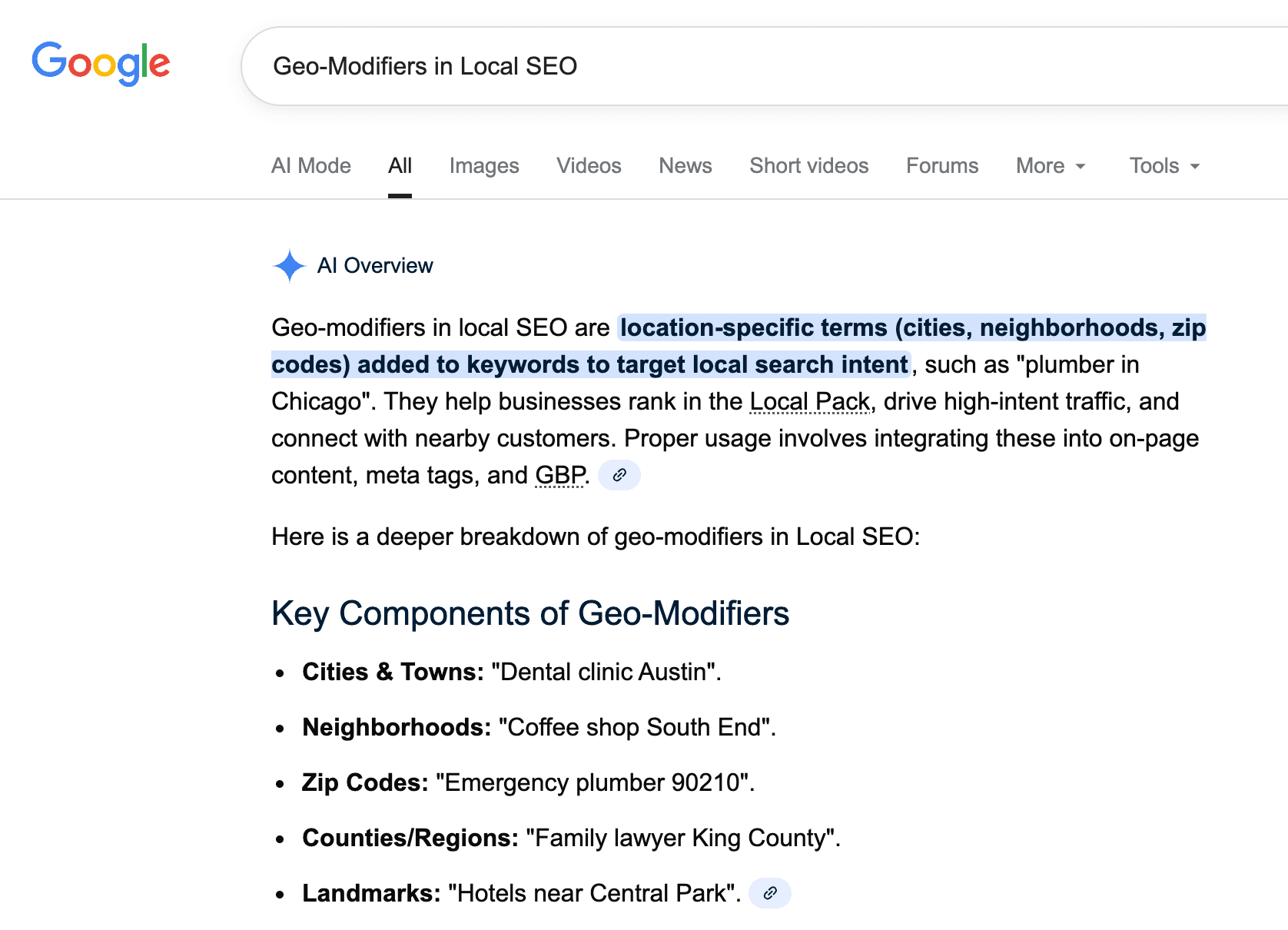
Geo-modifiers are location-based keywords that refine search queries to a specific geographic context. They can be explicit (like adding a city name or ZIP code) or implicit (phrases such as “near me” that rely on the searcher’s location).
Understanding these modifiers is fundamental because local intent changes the search landscape entirely: for example, a search for “plumber” versus “plumber in Boston” will trigger different results, with the latter activating local map listings and city-specific content.
Defining Geo-Modifiers
Geo-modifiers include any term in a search query that indicates location. This could be a city or town name, a neighborhood, a region, or relational phrases like “near me,” “nearby,” “closest,” etc.
For instance, in the query “best coffee shop Upper East Side,” the term “Upper East Side” signals a neighborhood in New York City. Such modifiers tell search engines where the user’s intent is focused.
They matter because search algorithms interpret these cues to deliver localized results (often via Google’s Local Pack or Google Maps).
In essence, geo-modifiers bridge the gap between user intent and geographic relevance, ensuring someone in Dallas finds a “home electrician” in Dallas, not in Denver.
From a business perspective, geo-modifiers are a lifeline to local visibility. If a home services company operates in multiple areas, including those area names in content and meta tags helps search engines recognize the company’s local relevance.
As a result, that company stands a better chance of appearing when someone nearby searches for its services.
In short, geo-modifiers are the vocabulary of local SEO. They define who sees your business online, based on where and what they search.
The Role of Local Intent in Search Queries
It’s not enough to know that geo-modifiers exist; we must grasp how frequently local intent drives search behavior. A substantial portion of search activity is local in nature, nearly half of all Google searches (around 1.6 billion queries a day) are seeking local information.
Consumers explicitly signal local intent by appending city names or “near me” to their queries, but even without those, search engines often infer local intent from context (especially on mobile devices).
Consider these impactful statistics: 97% of consumers check a business’s online presence before visiting in person, and 80% of local searches result in a lead, sale, or other engagement.
Local intent queries (like “HVAC repair near me” or “plumber in [City]”) indicate that the user often has an immediate need or high purchase intent. In fact, Google reports that searches including “near me” have surged by over 500% in recent years, a testament to how users are increasingly looking for solutions in their immediate vicinity.
These users are not casually browsing; they are ready to act. Approximately 28% of “near me” searches lead to a purchase, highlighting the immense commercial intent behind local queries.
Local intent also means that proximity and relevance become crucial ranking factors. Someone searching “Italian restaurant near me” on their phone will get results filtered by distance and city, not a generic list of nationally popular restaurants.
If your website clearly indicates where you operate (through geo-modified keywords and content), you align with this intent and improve your odds of appearing in those localized results.
In summary, local intent transforms a generic search into a local one and geo-modifiers are the textual clues that make this transformation possible.
How Geo-Modifiers Influence Search Rankings?
Geo-modifiers can significantly influence both local pack rankings (the map results) and localized organic rankings. Search engines aim to deliver results that best match the user’s location-specific query, so including location keywords can boost your relevance for that query.
In a survey of local SEO ranking factors, experts found that content “robust with… geographic keywords” is characteristic of high-ranking local pack results. In other words, top-ranking local businesses tend to feature their city or area name in their site content and metadata.
This correlation underscores a simple principle: if you want to rank for searches in a given locale, signal that locale to search engines.
On-page optimization is one arena where geo-modifiers make a direct impact. According to one SEO guide, “local keywords are a huge ranking factor for location pages” and should be incorporated naturally into your content.
This means using city or neighborhood names in your page titles, headings, and body text where relevant. For example, a title tag might read “Plumbing Services in Austin, TX | [Brand Name].”
Doing so communicates to Google that your page is highly relevant to someone searching for plumbing in Austin.
We also see geo-modifiers’ influence through case studies. When a regional home services company optimized its site with city-specific pages, the effect on rankings was dramatic. Each page targeted a different metro area with unique content and the city name in key places.
Over six months, their Google Maps 3-Pack rankings improved by 7–12 positions in those cities, simply by localizing their SEO strategy. It wasn’t just rankings, user engagement improved too.
By aligning content with local needs (even mentioning specific neighborhoods and local conditions), the company saw its bounce rate drop 34% and average time-on-page increase 48%.
These metrics indicate that visitors found the geo-specific content more relevant and engaging. In essence, geo-modifiers, when used appropriately, help search engines and users alike recognize that your business is a relevant local answer boosting both your visibility and user satisfaction.
City-Specific Keywords: Targeting Local Search at the Core
City-specific keywords are the backbone of geo-modified SEO strategies. They involve directly embedding city names into your target search terms (for example, “dentist Chicago” or “Miami real estate agent”).
For businesses that operate in distinct metropolitan areas or multiple cities, this approach ensures you capture searchers who include a city in their query. City modifiers target local search at the most fundamental level: the city where the transaction or service will take place.
Examples of City Modifiers in Action
To understand city modifiers, consider a practical example. Suppose you run a home services company offering plumbing across several Texas cities.
Rather than optimizing your site generically for “plumbing services,” you would create variations like “plumbing services in Austin, TX”, “plumber in Houston”, and “emergency plumbing San Antonio.”
Each of these phrases uses a city name as a modifier, honing in on a specific local market.
In a real-world case study, a regional home services brand implemented exactly this strategy. They built dedicated landing pages for three cities Austin, Houston, and San Antonio – each with SEO-optimized titles and content featuring the city name.
For instance, the Austin page’s title might have been “Top-Rated Plumbing Services in Austin, TX” and included copy referencing Austin-specific plumbing concerns. The impact was immediate and measurable.
The Austin page, for example, didn’t just rank – it drove action. Within half a year, that city saw its calls from Google Maps jump by 267% and website clicks from local search results climb by 152%.
Houston’s page performed similarly, with calls spiking over 300%. These numbers highlight the “impact” of city modifiers: by aligning content to the query “plumbing services in [city],” the business dramatically improved its visibility and user engagement in each locale.
Such examples prove that city keywords aren’t just academic concepts; they’re catalysts for growth.
It’s worth noting that the content on these city pages went beyond just inserting the city name – it was contextualized.
The Austin page mentioned local neighborhoods and conditions (“From Westlake to Mueller, our Austin crew knows the quirks of local plumbing codes…”), showing searchers that the business truly understands the area.
This level of hyper-local detail builds trust with users and sends stronger local signals to search engines. In short, city modifiers in action mean speaking the language of the local customer, which yields higher relevance and conversion.
Best Practices for City Keyword Targeting
Using city keywords effectively requires more than slapping a city name onto a generic keyword. Here are some best practices, guided by data and expert consensus:
- Create Dedicated City Pages: If your business serves multiple cities, build a separate, optimized landing page for each city. This is strongly recommended by local SEO experts; a dedicated page like “Foundation Repair in Chicago” or “Basement Waterproofing in Chicago” allows you to target that city’s search traffic directly. Each page should feature unique content tailored to that city’s audience.
- Use Unique, Locally Relevant Content: Avoid the common mistake of duplicating the same text across all city pages with only the location swapped out. Not only can search engines view this as thin content, but it also fails to address local nuances.
One SEO case study warns that using identical copy for each city leads to poor results consumer needs differ by location, and your pages must reflect those differences.
Instead, highlight what’s distinct about doing business in each city (climate, culture, local regulations, etc.). For example, mention Chicago’s winter weather if relevant to your service, or reference a local landmark or event.
- Showcase Regional Expertise: Build credibility by including city-specific testimonials, case studies, or examples. Did you complete a notable project in that city? Do customers there praise something about your service?
Including a few lines of local testimonials or examples will signal that you have on-the-ground experience. This isn’t just feel-good marketing – it can improve conversions.
When each service is marketed to a specific location, it showcases regional expertise and leads to improved conversion rates because local customers feel understood.
- Include City Keywords Naturally: While it’s important to have the city name on the page, avoid over-stuffing it. Search engines are sophisticated they need to see the city mentioned in strategic places (more on that below) but will penalize sites that cram “Dallas” into every other sentence unnaturally.
Write for humans first, ensuring the content reads smoothly. As one guide advises, incorporate the local keyword naturally so both readers and search engines gain value from the context.
- Optimize for User Intent within the City: Think about what a person in that city might specifically need. For instance, a “Boston HVAC repair” page might note the challenges of old heating systems in Boston’s historic homes.
A “Phoenix pest control” page might discuss scorpions or heat-resistant termites common in Arizona. This alignment with local user intent not only enriches your content but also sets you apart from competitors who use boilerplate text.
In our Texas case study, the team embraced hyperlocal relevance – weaving in local culture and even slang – rather than copy-pasting generic service descriptions. The result was stronger engagement and trust from users.
In summary, best practices for city targeting revolve around local focus and authenticity. It’s about creating a bespoke experience for each city’s visitor, which in turn tells search engines your site is the most relevant answer for that city’s queries.
Where to Place City Keywords (Pages, Tags, Content)?
Identifying the right city keyword is only half the battle – you must also place it optimally on your website.
Proper on-page SEO ensures that both users and search crawlers immediately recognize your local relevance. Key areas to include city modifiers are:
- Page Titles (Title Tag): The title tag is one of the strongest on-page signals. It appears in search results as the clickable headline. Including your city here is crucial. For example: <title>Roofing Contractor in Denver, CO | Trusted Denver Roofer</title>. This immediately associates the page with Denver. Experts consider optimizing page titles with location one of the fundamental steps after creating location pages.
- Meta Descriptions: While not a direct ranking factor, the meta description (the snippet of text under the title in search results) can reinforce relevance and improve click-through.
A concise meta description that mentions the city (e.g., “Offering fast, affordable plumbing services in Dallas. 24/7 emergency support for Dallas residents.”) assures the searcher that your page serves their city. It also helps your listing stand out when people specifically glance for their city name in results.
- Headers (H1, H2 headings): Your page’s main heading (often the H1) should usually include the city as well, echoing the title. For example, an H1 on the page might say “Professional Denver Plumbing Services”.
Subheadings (H2, H3) can incorporate neighborhoods or related terms if relevant, like “Why Choose Our Plumbers in Downtown Denver” – but only when it makes sense contextually.
Using headings in this way both improves SEO and makes the page immediately relevant to readers scanning the content (as they will see their city or area of interest called out).
- URL Slug: If feasible, include the city in the page URL. For example, yourwebsite.com/locations/denver-plumbing is preferable to yourwebsite.com/locations/plumbing1.
A clean URL with the city is an additional relevancy signal. Make sure to keep it concise and readable (avoid long strings of multiple locations or keywords in one URL).
- Body Content: Naturally weave the city name and related local landmarks or terms into your paragraphs. The first paragraph is a good place to mention the city to establish context.
Throughout the content, you might mention the city a few more times, especially in relation to services (“We provide electrical repairs across Seattle, from Capitol Hill to Queen Anne…”).
Avoid unnaturally repetitive use – aim for a balance where any human reader would clearly know the service area, yet the text still feels organic.
- Image Alt Text (if applicable): If you have images on your page (say a picture of your storefront or a team at work), use descriptive alt text that could include the city. E.g., <img src="team.jpg" alt="Photo of our Denver plumbing team serving a local home">.
This is a minor signal but contributes to overall relevance, and it aids accessibility for visually impaired users.
- Internal Linking Anchor Text: When linking between pages on your site, use geo-descriptive anchor text. For instance, on a general “Our Locations” page, link to the city page with text like “Plumbing in Austin” rather than a generic “Austin” or “click here.”
This helps search engines understand the destination page is about plumbing in Austin, and distributes authority with context. It also assists users in navigation.
A quick checklist for placement: Title, Meta, Headers, URL, Content, Alt text, Internal links. Each is an opportunity to affirm that a given page is about a service in [City Name]. Implementing this systematically can yield noticeable SEO improvements.
One SEO agency noted that simply optimizing these on-page elements for location (alongside adding the pages to your XML sitemap for indexing) is a key step many businesses overlook. Don’t forget the basics: they form the foundation upon which your local SEO efforts build.
Area and Neighborhood Keywords: Going Beyond City Limits
Sometimes targeting a whole city is still too broad – especially in large metropolitan areas where users identify strongly with their part of town. Area and neighborhood keywords zoom in beyond city-level, focusing on suburbs, districts, or colloquial neighborhood names within a city.
For example, instead of just targeting “Chicago,” a business might target terms like “Lincoln Park Chicago dentist” or “downtown Chicago coworking space.” This hyper-local approach is often called neighborhood SEO or hyperlocal SEO.
It recognizes that a city isn’t a monolith; searchers often seek services in their immediate vicinity or in specific parts of a city.
Why Neighborhood Targeting Matters?
Neighborhood targeting matters for both competitive differentiation and user relevance. In densely populated cities, competition for broad city keywords can be fierce. However, not everyone in a big city wants to travel across town for a service often they prefer something in their neighborhood.
By optimizing for smaller areas, you capture searchers with highly specific needs (and often less competition). For instance, “Brooklyn Heights pediatric dentist” will have a narrower, more qualified audience and fewer competitors than just “New York City dentist.”
Consumer behavior underlines this importance. As search engines have become better at understanding location, users have grown more granular in their searches.
Searches that include local micro-geographies (like neighborhoods or “near me”) have skyrocketed, indicating people want results tailored to their immediate surroundings.
Google’s own data shows over 150% growth in location-based queries in just two years, and queries combining urgency + locality (e.g., “open now near me”) up 400% in one year. While “near me” is a broad phrase, it often effectively means “in my neighborhood right now.”
This trend tells us that being present for hyperlocal searches is no longer optional it’s a key way to capture high-intent traffic.
Neighborhood targeting also signals a deeper level of local expertise. If your business website explicitly mentions coverage of, say, “SoHo” or “Santa Monica” or “Georgetown” (depending on the city), it conveys that you know those communities, not just the region.
Many consumers in big cities identify with their neighborhood first and city second; they trust businesses that appear to be local to their part of town. A neighborhood-focused strategy can therefore enhance trust and conversion rates.
Anecdotally, a real estate website that created neighborhood-specific guides (schools, amenities, safety etc. in each area) often sees higher engagement from local buyers than generic city-wide content because it resonates on a personal level.
In sum, neighborhood keywords matter because local searches are getting hyper-local. A business that “drills down” into neighborhoods can stand out in local SEO, capturing niche traffic that big, city-wide competitors might miss. It’s about meeting the user where they are – sometimes literally on their block.
How to Find the Right Area Keywords?
Finding the right area or neighborhood keywords requires research and local insight. Here are strategies to identify which micro-local terms to target:
- Leverage Local Knowledge: Start with what you (or your team) know about the city. Make a list of prominent neighborhoods, districts, suburbs, or even unofficial nicknames that locals use.
For example, a Los Angeles business should note areas like Hollywood, Venice, Koreatown, etc. If people commonly refer to “Uptown” versus “Downtown,” note those too. Your goal is to capture the language your potential customers use when describing their part of town.
- Use Keyword Research Tools with Location Filters: Tools like Google Keyword Planner, SEMrush, or Moz’s keyword explorer can sometimes estimate search volume for neighborhood terms. You might need to combine the neighborhood with a service in your search (e.g., check volume for “HVAC + [Neighborhood]”).
Keep in mind that volumes for very granular terms may be low or even zero in tools – but that doesn’t mean no one is searching, just that the tool’s thresholds might not catch them. Even low-volume terms can be valuable if they convert well.
Look also at Google Trends: you can often spot if certain sub-regions within a city have spikes for particular searches.
- Examine Google’s Autocomplete and “Related Searches”: Start typing your service query and a location into Google and see what it suggests. For instance, typing “daycare in San Francisco” might prompt suggestions like “daycare in San Francisco Mission District” or “… Nob Hill”.
Those suggestions are based on real user searches and can reveal which neighborhoods are commonly searched in your context.
Similarly, when you search a city-level term, scroll to the bottom of the results to see related searches sometimes, Google will list neighborhood variations there.
- Analyze Competitor and Directory Sites: See if competitors have pages targeting specific areas. For example, a city guide or directory (like Yelp) might categorize businesses by neighborhood.
If you notice many competitors highlighting certain area names on their pages, that’s a sign those terms have SEO value. Also, read customer reviews on Google or Yelp for phrases; customers might say “They’re the best florist in Buckhead” indicating that people think of your business in a neighborhood context.
- Use Google Business Profile Insights: If you have a Google Business Profile (formerly Google My Business), its analytics (Insights) can show the zip codes or areas from which people requested driving directions or viewed your listing.
This data can highlight clusters of interest. If you see a lot of engagement from a specific neighborhood, ensure you have content targeting that area by name.
- Consider Adjacent Areas and Nicknames: Sometimes a suburb or smaller town near a big city is worth targeting because people search by that name as well. For example, someone in a large city’s metro area might search for the suburb (“Plano electricians” rather than “Dallas electricians”).
If your service radius covers it, include those towns. Also consider colloquial names (e.g., “the Bay Area” vs. individual cities, or “Tri-State area”). While not neighborhoods per se, these are geo modifiers that might align with search habits for broader regions.
By combining these approaches, you can compile a targeted list of area-specific keywords. Prioritize them by relevance and potential search volume.
For instance, if “Downtown [City] [Service]” gets decent traffic and aligns with your customer base, that’s a high-priority term. On the other hand, a very obscure neighborhood that few people search might be lower priority unless it has exactly the clientele you seek.
Always balance the search volume vs. competition. Often, neighborhood keywords have lower volume, but also much lower competition, meaning you can rank easily and capture a small but highly interested audience. It’s a classic long-tail keyword strategy applied to local SEO.
Hyperlocal Content Strategy Tips
Targeting hyperlocal keywords isn’t just a technical exercise it calls for a hyperlocal content strategy. Once you’ve identified the neighborhoods or areas to focus on, tailor your content to deeply resonate with those communities. Here are some tips:
- Create Neighborhood-Focused Landing Pages or Sections: If you serve several distinct neighborhoods, consider making individual pages for each (similar to city pages, but on a smaller scale).
For example, a home cleaning service might have a page for “Manhattan – Upper West Side Cleaning Services” separate from “Brooklyn – Williamsburg Cleaning Services.”
Each page can speak to that area’s lifestyle (e.g., high-rise apartments vs. brownstones) and include testimonials or case studies from local clients. It demonstrates you’re not a generic provider; you’re part of the fabric of that area.
- Use Hyperlocal Hooks in Content: Mention local landmarks, streets, or institutions in your copy where relevant. For instance, a restaurant might say, “Conveniently located next to Dupont Circle” or “a short walk from the University of Washington campus.”
Such details not only improve local SEO but also make your content immediately relatable to someone from that neighborhood. In the earlier case study, recall how they wrote about Austin neighborhoods by name – “From Westlake to Mueller, our Austin crew knows...”. This kind of reference makes locals nod in recognition.
- Write Blog Posts with Neighborhood Angles: A great way to build hyperlocal relevance (and internal links) is through your blog or news section. Write articles that spotlight local topics and subtly tie in your business.
For example, a real estate agent could blog “Top 5 Family-Friendly Parks in Buckhead (Atlanta)” or a home security company might write “Crime Prevention Tips for East Nashville Homeowners.”
These posts provide genuine value to residents of those areas and position you as a local authority. Moreover, they can internally link back to your main service pages with neighborhood-specific anchor text, boosting SEO.
One agency suggests crafting content like “Where to go in X neighborhood” that serves as a local guide, while linking it back to your site’s core pages to strengthen your neighborhood authority.
- Incorporate Hyperlocal Schema Markup: If you want to get technical, consider using schema.org structured data to mark up details like neighborhoods served. For example, the LocalBusiness schema allows specification of service areas.
By adding JSON-LD schema listing neighborhoods or ZIP codes you serve, you give search engines explicit data about your hyperlocal coverage. This can complement your on-page keyword strategy (though schema alone won’t make you rank, it can enhance how your information is understood and displayed).
- Engage with Community Events or News: Use your site to highlight any community involvement. If your business sponsored the local “East Side Art Fair” or participated in a neighborhood charity run, mention it on your blog or press page.
Local news can be very engaging and earns goodwill. It might also earn you local backlinks (e.g., a mention on a neighborhood association website or local newspaper), which are valuable for SEO.
In our multi-city case study, they built links by sponsoring community events in each city – a tactic equally applicable at the neighborhood level. A hyperlocal backlink (like a community blog linking to you) is a strong signal of local relevance.
- Use Internal Linking to Tie Neighborhood Content Together: If you end up with multiple neighborhood pages or posts, create a structure to connect them. For example, have a “Service Areas” hub that lists all neighborhoods you cover, linking to each page.
On each neighborhood page, you might have a sidebar or footer linking to adjacent neighborhoods or the main city page (e.g., “Also serving nearby: [Neighboring Area]”). This siloing and cross-linking strategy helps distribute authority and guide both users and crawlers through your local content network.
- Monitor Hyperlocal Performance: Keep an eye on how your hyperlocal pages are doing. Google Search Console can show if those pages are gaining impressions or clicks for neighborhood terms.
You can even filter queries in Search Console for specific area names to see if you’re capturing them. If a page isn’t performing, you might refine its content (maybe add more local info, or improve the title).
If it is performing, consider expanding – perhaps adding a FAQ section answering neighborhood-specific questions (e.g., “Do you serve homes in [subdivision] as well?”).
By implementing these strategies, you truly embed your business into the digital landscape of each neighborhood.
Hyperlocal content is time-consuming because of its granularity, but the trust and SEO benefits it yields can be significant. You’re effectively out-localizing the competition.
For instance, if rival companies only have city-wide pages, while you have pages for five key neighborhoods with rich content, any search query that includes those neighborhood terms is far more likely to surface your site.
Hyperlocal efforts also future-proof your SEO to an extent: voice search and mobile search often use very specific location queries (like “find a locksmith in Chelsea now”).
As voice assistants grow, we expect more conversational queries including neighborhoods. By already having content tailored to those terms, you stand ready to capture that traffic.
“Near Me” Keywords: Capturing High-Intent Local Searches
The phrase “near me” has become synonymous with urgent, high-intent local searches. Queries like “pizza near me” or “open hardware store near me” signal that the user is looking for immediate solutions in their vicinity.
Unlike city or neighborhood keywords, “near me” is relative to the searcher’s current location. This category of geo-modifier deserves special attention because of its explosive growth and unique optimization considerations.
How “Near Me” Searches Work Technically
When a user includes “near me” in a search, they are implicitly asking the search engine to use their location data to find nearby options. Technically, Google interprets “near me” not as a literal keyword but as a proximity query.
The search engine will typically access the user’s geolocation (via browser or device GPS) and return results it believes are geographically close and contextually relevant.
For example, searching “pharmacy near me” on a phone will return pharmacies within a few miles (or even walking distance if in a city), sorted by factors like distance, ratings, and relevance.
Google’s algorithm has evolved to handle “near me” in a sophisticated way. In fact, Google now treats “near me” as a strong intent signal rather than a phrase to match exactly.
In the past, some websites tried to rank by literally including “near me” text on their pages (e.g., writing “If you’re looking for a bakery near me, choose us!” on their homepage). Modern search algorithms largely discount this tactic. Google “figures out” near me by understanding the user’s location and the business’s service area, not by needing to see the words “near me” on a webpage.
As an illustration, if you search just “Mexican restaurant” from your phone, Google will still show local results near you, it inherently assumes you mean “near me.”
A marketing expert put it succinctly: Google’s local algorithm has become so adept that users don’t even need to type “near me” to get near-me results. The presence of a geographical context (device location, map interactions) is enough.
However, users still often include “near me” out of habit or to emphasize urgency, and these searches remain very common.
The technical handling involves the interplay of Google’s local index (Google Business Profiles) and the organic index. Typically, “near me” searches will trigger the Local 3-Pack (a map with three business listings) prominently.
In fact, 93% of Google searches with local intent now display a Local 3-Pack, and “near me” queries are archetypal local intents.
One surprising insight from research is that being physically closest isn’t always the top ranking factor for “near me” searches. There was a study by LocalSEOGuide that found “being in the same city as the searcher” correlated more with ranking well on “near me” searches than pure distance.
In other words, Google might filter results first by broader locality (city or district) and then rank by relevance/prominence, rather than simply serving the nearest business by meters.
This suggests that even for “near me” queries, having a strong presence (good reviews, local content, backlinks) in your city is crucial proximity alone doesn’t guarantee top placement if your local SEO is weak. Google balances proximity with quality and relevance.
In summary, “near me” searches work through Google’s understanding of context and intent. The engine uses the query combined with user location to deliver immediate local results.
For businesses, the technical implication is clear: you must ensure Google knows where you are (via Google Business Profile, schema, consistent address info) and what you do, so it can consider you for those proximity-based queries.
And while you can’t optimize for “near me” by just adding that phrase to your site, you optimize by excelling in local SEO fundamentals because those are what get you into the “near me” results.
How to Optimize for “Near Me” Without Overstuffing
Given that “near me” is about context, not exact keywords, optimization requires a strategic approach. The goal is to capture those queries without resorting to outdated tactics like keyword stuffing “near me” everywhere (which is counterproductive). Here’s how to optimize smartly:
- Optimize Your Google Business Profile (GBP): This is step one. A fully filled out Google Business Profile is perhaps the most important asset for “near me” searches. Ensure your Name, Address, Phone (NAP) are accurate and that you’ve pinned your correct location on the map.
Select the right business categories and provide a detailed description including your services and service area. According to experts, a well-optimized GBP dramatically improves your chances of appearing in the Local Pack for relevant queries.
Add photos, respond to reviews, and keep the profile updated – these all boost your local relevance.
- Build Location-Specific Website Pages (No “near me” needed): As we discussed earlier, having separate pages for each city or area you serve is key. When you have “Plumber in Stamford” as a page (and likewise for other areas), you inherently cover the near-me demand for those locales without ever saying “near me.”
One agency pointed out that if you serve multiple areas, creating separate landing pages for each city or neighborhood makes it easier for Google to connect you with local searches – no “near me” is needed.
Essentially, if someone in Stamford types “plumber near me,” Google will prefer to show a page that clearly is about Stamford plumbing (all else being equal), even if that page doesn’t say “near me” at all. Your location pages act as catch-alls for “near me” searches in their respective areas.
- Use Natural Language on Your Site: Write content as if you were speaking to a local customer, not to a search engine. Instead of jamming “near me” awkwardly, you might include conversational lines that imply locality: e.g., “Looking for a dentist close by? Our clinic has served the Uptown area for 20 years.”
This way you cover synonyms like “close by” or mention the area, which Google will understand contextually. A BrightLocal study found that the vast majority (94%) of top-ranking local results showed no evidence of deliberate “near me” keyword insertion on their websites.
In other words, they ranked by being relevant locally (with proper location info and good SEO), not by literally using that phrase.
- Avoid “Near Me” Spam in Titles or Names: Once upon a time, businesses tried adding “near me” to their website titles or even to their Google Business name (“Joe’s Pizza Near Me”) to game the system. This is firmly discouraged.
Google actively penalizes such practices now. Cases have been documented where businesses that injected “near me” into their name or content saw negative effects. It’s considered spammy and misleading.
Google’s quality guidelines and algorithms flag excessive keyword use as spam and can lower your rankings for it. So keep your titles professional and to the point (use the city name, yes; “near me,” no).
- Emphasize Proximity in Content Indirectly: You can convey that you are nearby in ways that don’t involve the phrase “near me.” For instance, highlight that you are “located in [Neighborhood]” or “serving customers within a 5-mile radius of [City Center].”
On your contact page, embed a Google Map of your location and maybe write driving direction snippets (e.g., “5 minutes from Union Square”). These cues confirm to both users and Google that you are, indeed, a local solution.
- Cultivate Reviews that Mention Location: This is a subtle but powerful tip. If customers mention your location in their Google reviews (“Really convenient gym for anyone in downtown Phoenix!”), those keywords can help you indirectly.
While you cannot (and should not) script reviews, you can encourage customers to mention what neighborhood they’re from or what area you served, if they’re comfortable.
Reviews are content too, user-generated content that Google trusts. Also, a high quantity of good reviews improves your local pack ranking in general.
- Ensure Mobile-Friendly Site Performance: Many “near me” searches occur on mobile (about 84% of “near me” inquiries happen on mobile devices). If those users click through to your site, you want fast load times and mobile-optimized design, or they’ll bounce.
Google also considers mobile usability in rankings. Think of “near me” searchers as people on the go – your site should cater to that scenario (click-to-call buttons, easy directions, simple interface).
- Use Paid Search as a Supplement: While not an SEO technique, it’s worth noting that for some “near me” queries, you might also run Google Ads targeting those terms.
It can be competitive, but if you bid on “[service] near me” in your area, you might capture additional traffic while your organic SEO builds up. Just ensure your ad and landing page still deliver a local experience (mention your address or service area prominently).
The overarching principle is: optimize for local relevance, not for the literal phrase “near me.” By following best practices in local SEO (robust GBP, localized pages, quality content, mobile optimization), you inherently make your business a top candidate for “near me” searches.
This approach is validated by data: a study found that 69% of top-ranking results for local queries had no “near me” optimizations on their website – meaning the sites succeeded through genuine local strength.
In contrast, explicitly overusing “near me” could backfire. It looks unnatural to users (“near me” from whose perspective? it’s awkward text on a page) and can trigger spam filters.
Google’s algorithms now flag and downrank pages that engage in keyword stuffing, including redundant location phrases.
The bottom line: let your service pages and local SEO carry the weight for “near me” searches, and you’ll capture those high-intent customers without ever having to cheat the system.
Role of Mobile, Maps, and Voice Search
The rise of “near me” searches is deeply intertwined with the proliferation of smartphones, map-based navigation, and voice-activated assistants. These technologies have changed how people search for local businesses, making queries more conversational and immediate. Let’s break down their roles:
- Mobile: Mobile devices are the primary driver of “near me” searches. It’s no surprise that a whopping 82% of “near me” searches happen on mobile devices (and some sources put it at 84%). Additionally, consider that 78% of location-based mobile searches result in an offline purchase (often within a few hours or a day).
Mobile local searches are extremely action-oriented; they frequently convert to store visits or orders. So capturing mobile “near me” traffic can directly boost foot traffic and sales.
- Maps: Google Maps (and Apple Maps to a lesser degree) has become an interface for search in itself. Many users open their Maps app and search for “restaurants” or “pharmacies,” effectively doing a “near me” search without typing those words.
Google’s integration of Maps with search means that optimizing your business for Google’s local algorithm (via Google Business Profile, consistent NAP, and reviews) is how you ensure you appear on the map for those queries.
Notably, when users search for local businesses on Google, 93% of those searches include the Local Pack (the map listing).
And those map results attract a large share of clicks – one set of statistics indicates that the Local Pack results get 44% of the clicks on a local results page. Users trust map results because they’re visual and tied to location.
Therefore, being featured prominently on Google Maps – through good reviews, correct categorization, proximity, and SEO is critical. The “near me” game is, in many ways, a Google Maps visibility game.
Make sure to also consider that directions and navigation queries stem from maps; double-check that Google Maps has your correct address and that the pin is in the right place.
- Voice Search: Voice assistants like Siri, Google Assistant, and Alexa have added a new dimension to local search. People speaking to their devices often use natural language, which frequently includes local intent phrases.
For example: “Hey Google, find a coffee shop near me open now” or “Alexa, is there a 24-hour pharmacy nearby?” Voice searches tend to be longer and more specific. A significant trend: 46% of users perform voice searches daily to find information about local businesses.
Furthermore, 58% use voice search to get details on local businesses (like store hours or addresses) because it’s convenient on the go.
This means a large chunk of “near me” searches may actually be happening via voice, not typed text. Voice SEO is a bit different – it favors sites that directly answer questions and have conversational content.
It also often pulls answers from structured data or high-authority sources. To optimize for this, ensure your local SEO is tight (since Google Assistant often relies on Google’s local results), and consider adding an FAQ section that might align with voice queries (e.g., “Q: Where can I find a bakery near me in Boston? A: Our bakery in Boston’s North End is open… etc.”).
Another insight: many voice searches funnel into mapping apps, e.g., Siri uses Apple Maps and Yelp data for local queries. So if you want to capture voice searchers, maintain your listings on Apple Maps and Yelp as well, not just Google.
- The Convergence of Mobile, Voice, and “Near Me”: Voice searches are predominantly on mobile devices (smartphones) or smart speakers at home. When someone uses a phone’s assistant, it combines voice input with the phone’s location services to find nearby results.
For instance, “OK Google, find a plumber near me” spoken into an Android phone will use your GPS and search Google’s local index. Smart speakers in the home might use your address (if known) as a base.
Roughly 76% of smart speaker owners perform local searches at least weekly, showing how voice is becoming routine for local discovery. This means the formats in which results are delivered diversify – sometimes it’s spoken answers (“The nearest plumber is 2 miles away, would you like their number?”) or a push of info to your phone.
In practical terms, businesses should ensure consistency across all platforms that feed local info: Google, Apple, Bing, Yelp, Facebook, etc. A person might use Google Maps on Android (pulling Google data) or ask Siri on an iPhone (pulling Apple/Yelp data).
If one of these has outdated or no info on your business, you’ll miss those queries. Also, feature your operating hours and real-time updates (like holiday hours) on your profiles – queries containing “open now near me” have jumped massively, which suggests many voice or mobile searches are checking if a business is open at that moment.
If your hours aren’t updated and your listing says closed when you’re actually open (or vice versa), you lose customers.
Finally, consider the user experience after discovery. A mobile or voice searcher might want immediate action: calling, driving there, or placing a quick order. Make those actions easy.
Implement tap-to-call buttons, ensure online ordering works on mobile, and integrate with map apps for directions. The synergy of mobile, maps, and voice is all about instant gratification – the businesses that win are those who can be found instantly and can serve the customer’s need instantly.
How to Research and Prioritize Geo-Modified Keywords?
Identifying geo-modified keywords (whether city, area, or “near me” terms) that are worth targeting is a crucial part of your local SEO strategy.
It ensures you invest effort where it can yield returns. The process involves using keyword research tools, analyzing search results, and leveraging your own data to prioritize which local terms to focus on. Here’s how to approach it methodically:
Start with traditional keyword research tools, but with a local twist. Tools like Google Keyword Planner, SEMrush, Ahrefs, or Seobility allow you to input seed terms and get suggestions along with search volume estimates.
To find geo-keywords, include location terms in your seeds. For example, instead of “plumber”, search for “plumber [City]”.
The tool may return variations like “best plumber [City]”, “emergency plumbing [City]”, etc. Some tools let you filter by location or simulate queries from a specific city – use those features to refine results to your target region.
Keep in mind: the volumes shown for local terms are often lower than for broad terms (e.g., “dentist in Kansas City” might show 90 searches/month whereas “dentist” might be 10,000 nationwide).
Don’t be discouraged by what looks like small volume, those are highly qualified 90 searches if they’re local and relevant.
Beyond tools, perform manual SERP analysis. This means actually googling the terms you think are important and seeing what comes up. This yields two insights:
- What type of results appear? If you search your keyword and see a Local Pack and mostly local businesses in results, that confirms it’s treated as a local intent query by Google.
For example, searching “roof repair” while in Denver will likely show Denver roofers indicating Google assumes local intent. If your keyword triggers no local results (e.g., “how to fix roof leak” might just show how-to articles), then a location page might not rank for it; perhaps a blog post or guide is more suitable.
You want to identify which queries Google associates with local intent. A sign of local intent is the presence of map listings or geo-specific titles in the top results.
- Who is ranking? Take note of the domain and titles of the top results. Are they directories like Yelp or HomeAdvisor? Competitors’ homepages or dedicated city pages?
If you see aggregator sites (e.g., Angi list of “Top 10 plumbers in [City]”), that implies the keyword is competitive and broad. If you see mostly individual businesses’ pages, that’s a good target, it means a well-optimized business site (like yours) can rank.
Also, if you see some gaps for instance, maybe no one has a proper “[Service] in [SmallerNeighborhood]” page and Google is just showing larger city results – that’s an opportunity for you to create the first strong page for that term.
In your analysis, jot down keyword variations you see in the “People also ask” boxes or related searches. Google often highlights related local queries (like “What is the cheapest plumber in X?” or “24-hour plumber [City]”).
These can give you content ideas and reveal user questions that you could answer on your site.
There are also specialized local SEO tools and techniques. For example, BrightLocal and Whitespark offer local keyword finding tools that aggregate common local search terms.
You might also use Google Trends to compare interest levels in different locations or between terms (“pizza near me” vs “pizza [City]”) to gauge relative popularity.
If you have an internal site search on your website, examine the logs – do users search your site for city names or directions? That can hint at what they expect.
Evaluating Search Volume vs. Competition
Once you have a list of potential geo-modified keywords, you need to prioritize them. Two key axes for prioritization are search volume (demand) and competition (difficulty).
- Search Volume: As noted, many local terms will have modest absolute volume. However, they often carry high intent. Use volume as a relative guide rather than an absolute decision-maker.
If “lawyer in San Francisco” has 500 searches/month and “lawyer in Palo Alto” has 100, it’s clear the SF term has more demand. But if your practice is in Palo Alto, those 100 searches are extremely valuable to you.
Look at volumes to get a sense of the big players (often the main city names) versus smaller areas.
Keep an eye out for surprisingly high volumes on some modifiers; sometimes a suburb or region keyword might have more searches than you expect, indicating a trend (e.g., if a certain neighborhood becomes popular, more people search for businesses there).
- Competition: This is trickier to measure, but tools often give a keyword difficulty score. You can also infer competition from the SERP analysis – if the top results are entrenched directories or very SEO-savvy competitors, that term is highly contested.
Newer or smaller sites might struggle to rank for “big” geo-terms like major city + broad service (e.g., “New York hotels” is dominated by huge booking engines and well-known hotels). In contrast, “boutique hotels in Brooklyn” might be less competitive.
Evaluate your own domain’s strength (backlinks, authority) and be realistic: target some low-hanging fruit (less competitive, niche terms) especially if you’re early in SEO, while gradually building up to tackle the high-competition head terms.
- Relevance and Conversion Potential: Also weigh how relevant a term is to your actual service and how likely it will convert. A high-volume local keyword that isn’t exactly what you offer might not be worth chasing hard. For instance, if people search “free museum in Chicago” and you run a paid museum, ranking for that might bring traffic but not conversions. Focus on terms that align with what you truly provide (often these are service + location combos, not just any popular local search).
- Long-Tail vs. Head Terms: In local SEO, long-tail keywords could be very specific queries like “emergency pediatric dentist in Queens open Sunday”. Each such query may have tiny volume, but collectively long-tails can bring substantial traffic.
You typically address long-tails by having robust content (FAQs, blog posts, etc.) and a well-optimized site, rather than individual pages for every query.
That said, if you identify a pattern of long-tail queries (for example, many people search “X near [Landmark]” in your city), you might incorporate those into your content (maybe a section about your proximity to that landmark).
Use tools like AnswerThePublic or Google’s “People also ask” to gather common long-tail questions related to your service and locale.
- Seasonality and Trends: Check if some local searches spike seasonally. “AC repair [City]” might peak in summer; “heating [City]” in winter. Use Google Trends to see if your keywords have seasonal patterns in your region. This can help you schedule content updates or ad campaigns at the right times.
Also, trends: for instance, searches for “outdoor dining near me” surged during certain periods; if you were a restaurant that set up outdoor seating, optimizing for that term and related modifiers could have been timely. Being attuned to trends can give you an edge where competition hasn’t reacted yet.
After this evaluation, create a prioritized list of keywords. A useful approach is to categorize: e.g., Primary keywords (usually [service] + [main city]) – these get core pages and heavy optimization; Secondary keywords (service + secondary areas or specific modifiers like “24/7”, “best [service] in [city]”) – these might be addressed in subsections or blog content; Long-tail FAQs integrate into Q&A or blog posts.
For each primary keyword, ensure you have a dedicated page or a strong section of a page. For each secondary, consider if content can be added or improved to target it (maybe a paragraph or a subsection covering that angle, or a separate page if warranted). Long-tails often can be covered in a comprehensive FAQ or guide on your site.
Finally, remember to periodically revisit your keyword research. Local markets evolve – if a new neighborhood develops or terminology changes (“near me” explosion being a case in point), you’ll want to update your SEO targeting.
Using Google Search Console here is smart: monitor what geo terms you’re getting impressions/clicks for. You might discover new keywords users find you with, which you hadn’t explicitly targeted, then you can double down on those if desired.
Using Customer Data and Google Search Console
Your own customer data and site analytics are a goldmine for refining geo-keyword strategy. Often, the insights gleaned from real user behavior can validate or challenge the assumptions from keyword tools.
- Google Search Console (GSC): GSC is invaluable for understanding how your site performs in search. It shows the queries that led people to click on your site (and those where you got impressions but not clicks). Use the GSC Performance report and filter queries by your location keywords.
For example, filter to queries containing your city name, or common terms like “near me” or “nearby.” This can reveal phrases like “emergency plumber [City]” or “best [service] in [City]” that you might not have explicitly optimized for yet appear.
If you see queries in GSC that you don’t have a dedicated page or section for, consider creating content to better serve those searches (if they’re important to your business).
GSC also lets you filter by geography, so you can see if people from neighboring cities are landing on your site searching for “[your city] + service” (which might indicate you could expand to their city, or at least include that geo term somewhere).
- Google Business Profile Insights: If applicable, look at the search queries report in your Google Business Profile dashboard. It often lists the top search queries (on Google Search or Maps) that led to your business listing. These can include surprising variations of your services and locations.
For instance, it might show lots of people found you via “affordable [service] [city]” or via certain zip codes. It also breaks down whether people used direct business name searches vs discovery searches (generic). The discovery queries portion is essentially local SEO keywords people used.
- Customer Addresses / Zip Codes: Analyze where your customers actually come from. For a brick-and-mortar, you might collect zip codes at purchase or have access to that data via loyalty programs. For service businesses, look at your past appointment addresses or inquiry forms.
You might find clusters of customers in areas you haven’t heavily targeted in SEO. If 30% of your clients are in a particular suburb but your site barely mentions it, that’s an opportunity to create content targeting that area explicitly (to both solidify your presence there and attract more like them).
- Customer Surveys / Feedback: Sometimes simply asking can help. If you have an email list or a post-purchase survey, you could ask: “How did you find us?” or “What did you search for?”
Customers might say “I searched online for ‘best catering in Springfield’ and found you.” Such qualitative data can confirm which keywords are actually driving business (and which align with a user’s mindset, e.g., emphasis on “best” or “affordable” in their search).
- Analytics Location Data: Google Analytics (or any web analytics platform) provides location data of your site visitors. Look at the cities and towns that bring traffic (especially organic traffic).
Are there cities where you get impressions but low engagement? Perhaps people from a city keep landing on your site looking for a service you only offer in a different location – which might mean you should clarify service areas or create targeted pages for them if you can serve them.
Or maybe you see a rise in visitors from a city where you haven’t marketed – that could hint at word-of-mouth or other forces, and you might capitalize by focusing some SEO there.
Also check the behavior of local vs non-local visitors: usually, local ones (from your city or region) will have lower bounce rates and higher conversion if your content is geo-relevant. If not, you might need to tailor content better.
- Conversion Data by Location: If you track leads or sales, break them down by location of the user (if available, perhaps via CRM or by gleaning from mailing addresses, etc.).
For example, if you notice that visitors from City A fill out your contact form at twice the rate of those from City B, you might prioritize City A in SEO (or investigate what’s not appealing to City B and adjust the messaging for them).
Maybe City A’s page has a testimonial from a local client and City B’s doesn’t – little factors like that can influence conversion.
Using this internal data helps in prioritization: you focus on the areas and terms that actually bring business, not just what might bring traffic.
It also closes the loop on your SEO efforts: after implementing changes, you’ll observe via GSC or analytics how your share of impressions/clicks for certain geo terms changes, and how that translates to real customers.
For example, after adding a “Neighborhoods We Serve” section listing several areas, you might see impressions for those area names increase. If inquiries from those areas also increase, you’ve achieved the goal.
To illustrate, suppose a law firm notices in GSC that a lot of people search “lawyer [County Name]” and find their site. If that firm’s site never explicitly mentioned the county, it’s ranking perhaps due to Google’s understanding of their address.
The firm could create a page about serving clients in [County Name], and perhaps move from just an impression to earning the click (and eventually the call) by being more directly relevant.
In conclusion, effective geo-keyword research is iterative: discover via tools, validate via SERPs, prioritize via data. It combines the art of understanding your community and audience with the science of using analytics and search data.
By doing this homework, you ensure that the content you create and optimize is aligned with genuine search behavior and business opportunities, which is the hallmark of a smart SEO strategy.
Common Mistakes to Avoid with Geo-Modifiers
While geo-modifiers are powerful, misusing them can backfire. It’s important to avoid certain pitfalls in local SEO that businesses often fall into when trying to optimize for locations.
Let’s highlight these mistakes and why they harm your SEO or user experience:
Keyword Stuffing and Over-Localization
“Keyword stuffing” refers to the outdated SEO practice of cramming keywords (in this case, location terms) into webpages as much as possible, hoping to manipulate rankings. Over-localization is a similar concept overusing local references to the point of unnaturalness.
For example, a webpage footer that lists every city in the state (“Plumber serving: [50 city names]…”) or a paragraph that reads: “If you need a Boston dentist, call our Boston dental clinic for the best Boston dental care in the Boston area.”
Such tactics make the content read poorly, and Google’s algorithms now penalize this kind of over-optimization. Their goal is to provide the best user experience, and a page stuffed with repetitive keywords is seen as low-quality or even spam.
A survey of local SEO findings explicitly noted: “Please stop spamming your city/state info in on-domain content” because research showed it doesn’t correlate with higher rankings.
In other words, adding “Chicago” 20 times on your page won’t raise you above a competitor who uses it 3 times meaningfully. Quality trumps quantity here.
Consequences of Keyword Stuffing:
- Lower Rankings: Google’s algorithms (like the Hummingbird and RankBrain updates, as well as core quality algorithms) understand semantic meaning and also detect unnatural repetition.
Pages that engage in stuffing can be ranked lower or even filtered out for certain queries. Search Engine Journal and other industry analyses have confirmed that excessive keyword use is flagged as spammy and can lead to ranking penalties.
- Poor User Experience: Users may get turned off or mistrustful if a page reads awkwardly. Imagine a user sees a block of text listing 20 neighborhood names; it looks like SEO filler, not genuine content. This can erode the user’s perception of your professionalism.
- Wasted Content Opportunity: Space used for keyword stuffing could have been used for something useful (like answering a user question or highlighting a benefit). So there’s an opportunity cost.
Avoiding Over-Localization:
- Use geo keywords in moderation and in context. For example, instead of listing neighborhoods with no context, write a sentence like “We have happy customers across Memphis, from Midtown to Germantown.” That mentions two areas in a natural way, rather than a laundry list.
- If you want to mention multiple locations, consider formatting them in a user-friendly way. Perhaps a bulleted list under a heading “Areas We Serve:” – but keep it reasonable and maybe add a line or two about each if possible (even if just “ – Residential & commercial clients”). This provides context so it’s not pure keyword list.
- Don’t add “near me” to content thinking it helps – as discussed, it usually doesn’t. One common mistake: adding “near me” to meta titles.
- Keep an eye on keyword density naturally. There’s no perfect %, but if every sentence has the city name, it’s too much. Aim for readability. One trick: read the copy out loud. If you start sounding like a robot or it jumps out how often you’re repeating the city, dial it back.
Over-localization can also refer to doing things like creating separate pages for extremely granular overlaps (like one page for each neighborhood when content doesn’t justify it). If each page is thin, that’s a mistake (see next section on duplicate pages).
A better approach often is to consolidate or to create one strong page per meaningful area rather than dozens of weak pages for every little spot.
Duplicate City Pages with Thin Content
Another common misstep is creating multiple pages targeting different locations but not investing in making them unique.
For instance, an HVAC company might make 20 city pages for 20 suburbs, all saying: “We offer heating and cooling in [CityName]. Call us for [service list]” – and nothing substantially different on each. This is thin content and duplicate content in Google’s eyes.
The intention behind such pages is understandable: catch all possible local searches. But if they lack unique value, Google may not rank them all – in fact, it might pick one as “canonical” and ignore others, or worse, it could see it as an attempt to manipulate search results.
A professional local SEO guide warns that using identical copy for each city and just changing the name is not effective. It doesn’t drive results because it doesn’t consider how consumer needs differ or what specific information they seek for each location.
Problems with duplicate/thin location pages:
- Search Engine Dilution: If all pages are nearly the same, Google might have trouble deciding which one to show, or might think your site is low-quality overall. You end up competing with yourself. There’s a Google algorithm called “Panda” (focused on content quality) that could devalue your site if many pages are low-value duplicates.
- Wasted Crawl Budget & Indexing Issues: Googlebot has finite time for each site. Loads of low-value pages might waste crawl budget and some pages might not get indexed at all. It’s not uncommon to see large multi-location sites where only a handful of their dozens of city pages are actually indexed because Google deemed others too similar.
- User Turn-off: If a user somehow clicks on two different city pages on your site (say they navigate to another nearby city out of curiosity) and see the exact same text, it erodes trust. It feels like boilerplate, not genuine local expertise.
How to avoid this mistake:
- Only create location pages you can actually fill with useful info. If you know you can only write a good detailed page for the major city you service and maybe a couple of large suburbs, do that and perhaps list the smaller areas within those pages rather than making a page for each. It’s better to have 5 great pages than 20 shallow ones.
- Differentiate each page significantly. This can include:
- Unique introduction focusing on that locale.
- Different subheadings (maybe each city page has a section on “Common [industry] issues in [City]” which would naturally differ between locations – e.g., coastal town vs inland).
- Custom images if possible (storefront in that city, team serving that area, etc.). At least use different stock images labeled for each city.
- Specific testimonials or project examples from that city (as discussed before).
- Mention any team members from that area or if you have an office there.
- If one location has a particular service or product emphasis, highlight that.
- Even a short paragraph about the city: “Serving [City] – a community known for [insert something]. We love being part of this vibrant area, whether it’s helping residents of [Neighborhood] with aging historic homes or new developments like [NewMall].” These touches make pages distinct.
- Consolidation if necessary: If you realize you made a lot of thin pages, consider merging them. For example, instead of separate pages for 5 small towns, have one page “Areas We Serve in XYZ County” and cover those towns on one page with sections for each. That one page might rank for all of them collectively better than each small one would have.
- Quality over quantity: It's worth repeating. A single excellent city page that ranks #1 is far more valuable than ten mediocre pages ranking on page 3. In SEO, being ruthless in pruning or improving low-quality pages can actually boost your overall site performance (some SEO experiments show removing thin content helped the rest of the site rank better – the “less is more” effect).
One more nuance: Sometimes businesses auto-generate city pages by script (just inserting city names). This is doorway page territory, which Google explicitly forbids. Doorway pages are those created solely for search engines that funnel to the same destination.
If your pages are essentially doorway pages – indistinguishable except for a keyword swap – you run a risk of a penalty. Always ensure each page is created for humans in that city first, not just for Google.
Ignoring Search Intent and Context
Not understanding what the user is truly looking for when using a geo-modifier can undermine your SEO efforts. “Search intent” refers to the underlying purpose of a query is the person looking to buy something (commercial intent), find a specific site (navigational), or just learn about something (informational)? In local search, intent can vary even if queries look similar. Ignoring this means you might optimize for the wrong things or present content that doesn’t satisfy the user’s needs.
Common misalignments:
- Ranking the Wrong Page for the Query: If a user searches “[service] reviews [City]”, they might want an aggregate of reviews or a third-party perspective. If your homepage tries to rank for that, it may not get clicks because it’s not a reviews page.
- Not Addressing Urgency or Specifics: Many local searches include context words like “now”, “today”, “open”, “cheap”, etc. These give clues. “Open now near me” implies a need for immediate information on store hours if your site doesn’t clearly display “Open 24 hours” or current opening times, that searcher will skip you.
Google noted a surge of 200%+ in “open now near me” mobile searches recently, reflecting this immediate intent.
- Overlooking Informational Intent: Not all local searches are “I want to buy right now.” Some might be research-phase queries. For example, “how much does HVAC installation cost in Phoenix” – the user might be early in research.
- Local Context beyond Location: Search context can include local culture or conditions. Ignoring that can be a mistake.
How to honor search intent and context:
- Put Yourself in the Searcher’s Shoes: For each keyword you target, ask what likely prompted that search. Is the user panicked (e.g., locksmith near me – probably locked out)?
Are they comparing options (“best something” – likely want reviews or lists)? Are they looking for a quick transaction (“buy [product] in [City]” want inventory or ecommerce)?
- Examine the Current SERPs: Google’s results often tell you what it believes users want. If all top results for “best burger in town” are listicles or Yelp, that means user intent is to see comparisons, not one restaurant’s page.
- Use Clear, Honest Messaging: Especially for things like hours, service areas, etc. If you only operate M-F 9-5, don’t try to rank for “emergency” or “24hr” keywords – you’ll get clicks and then angry users who realize you’re closed.
- Incorporate FAQs on Pages: A well-structured FAQ section can capture various intents.
- Don’t Ignore Negative or Implied Intent: Sometimes context is in what the user doesn’t say directly.
By avoiding these mistakes, stuffing, duplicating thin content, and misinterpreting intent you position your local SEO on solid ground. In short, think of the user first.
Google’s continual algorithm updates all aim to reward sites that deliver what the user is seeking. If you use geo-modifiers in a user-centric way, you’ll avoid the penalties and pitfalls that come from trying to game the system.
Conclusion: Geo-Modifiers as a Growth Lever in Local SEO
In closing, geo-modifiers are not just an SEO tactic; they are a fundamental strategy for business growth in any locally-driven market. We began by noting that roughly 46% of Google searches seek local information an astounding figure that underscores why honing your geo-modifier approach is worth the effort.
From city names to neighborhood nicknames to “near me” queries, these location cues align your business with the customers who are most ready to engage.
Revisiting Your Local SEO Plan: Given everything discussed, it’s wise to revisit your local SEO game plan with fresh eyes. Consider creating a checklist or spreadsheet mapping each geo-modifier (cities, districts, “near me” variants relevant) to a corresponding action on your site:
- Do we have a page targeting this? If yes, is it ranking as expected? If not, why not – does it need better content or links?
- If we don’t have a page, can we fold that into another page, or do we create a new one?
- Are there opportunities for new content pieces (blog or FAQ) to capture local questions we haven’t addressed?
- Are our business listings across the web reflecting our current service areas and hours?
- Have we garnered local reviews, and do those reviews mention our geo terms organically? If not, perhaps encourage more feedback.
- Are we leveraging geo-targeted Google Ads or social media ads in conjunction to maximize visibility for certain keywords where organic is tough? Sometimes a combined approach yields the best results.
By systematically auditing, you might discover quick wins maybe your “Areas We Serve” page is not linked prominently, a quick menu addition could improve user flow; or you find that one of your city pages has no call-to-action, so people visit but don’t convert – a fix could raise leads.